Professional Unit Testing in Delphi and C++Builder: Meet Dext Test Explorer and in-IDE Coverage
By Cesar Romero — 23 October 2026
For years, writing automated unit tests in Delphi was a fragmented experience. Not because developers lacked interest, but because the effort required to establish a modern, end-to-end testing pipeline was disproportionate.
While contemporary ecosystems like .NET or Java offered native, integrated suites featuring attributes, fluent assertions, mature mocking libraries, fast visual runners, and code coverage directly inside the code editor, the Delphi ecosystem remained largely fragmented. Developers had to piece together isolated solutions: test runners carrying legacy designs from the 2000s, standalone mocking libraries lacking unified lifecycle or dependency injection patterns, and coverage utilities operating purely as external command-line tools emitting static HTML reports that forced developers out of the IDE to manually hunt down unexecuted lines.
The result? Teams spent more time gluing tools together, resolving repository version mismatches, and writing compilation scripts than actually writing tests for the business rules that pay the bills.
Having spent nearly seven years as a software engineer and architect on large, globally distributed .NET/C# systems, I grew accustomed to a frictionless testing experience: write a test, open the Visual Studio Test Explorer, hit Run, navigate to failing lines with a double-click, and see covered code highlighted in the margin of the active editor.
When I set out to bring that same level of engineering maturity to Delphi with Dext Testing (part of the Dext Framework), the goal was ambitious: not another simple wrapper, but a cohesive, production-grade testing ecosystem.
Following a focused and productive sprint, Dext Testing has taken a major stride forward. In this article, I share the current state of Dext Testing, the arrival of C++Builder support, the game-changing in-IDE Code Coverage gutter, and an exclusive preview of my upcoming book on the subject.
1. The Map: From .NET Standards to Dext Testing
Section titled “1. The Map: From .NET Standards to Dext Testing”Rather than assembling arbitrary tools, we mapped the features modern software engineers take for granted in other languages and built their equivalents in Object Pascal:
| .NET / Visual Studio | Dext Testing | Maturity | Role in the Ecosystem |
|---|---|---|---|
| xUnit / NUnit (attributes) | Dext.Testing.Attributes | Stable | Attribute-based tests ([Fact], [Theory], [TestCase], lifecycle) |
| FluentAssertions | Dext.Assertions (Should) | Stable | Expressive, readable assertions with descriptive failure messages |
| Moq / NSubstitute | Dext.Mocks | Stable | Fluent mocking with dynamic runtime interception |
| Verify / Snapshots | MatchSnapshot | Stable | Regression and approval testing against verified baselines |
| WebApplicationFactory | TDextApplicationFactory | Stable | In-process HTTP integration tests without external web servers |
Coverlet / dotnet test | dext test --coverage | Stable | Command-line test execution with coverage reports for CI/CD |
| JUnit / TRX / SonarQube | Dext.Testing.Report | Stable | Native test and coverage exports for enterprise Quality Gates |
| TestInsight / Adapters | DUnit / DUnitX / DUnit2 Adapters | Stable | Runs existing suites side-by-side without rewriting fixtures |
| Visual Studio Test Explorer | Dext Test Explorer | Evolving | Dockable RAD Studio Expert with asynchronous runner and discovery |
| Editor Coverage (Gutter) | Coverage Gutter & Tab | Evolving | Visual line highlighting in the editor (covered, uncovered, partial) |
| C++ Test Explorer | C++Builder Support (GTest & DUnit) | Evolving | Single Expert running C++ projects and covering Win64x |
2. Inside the IDE: The Dext Test Explorer
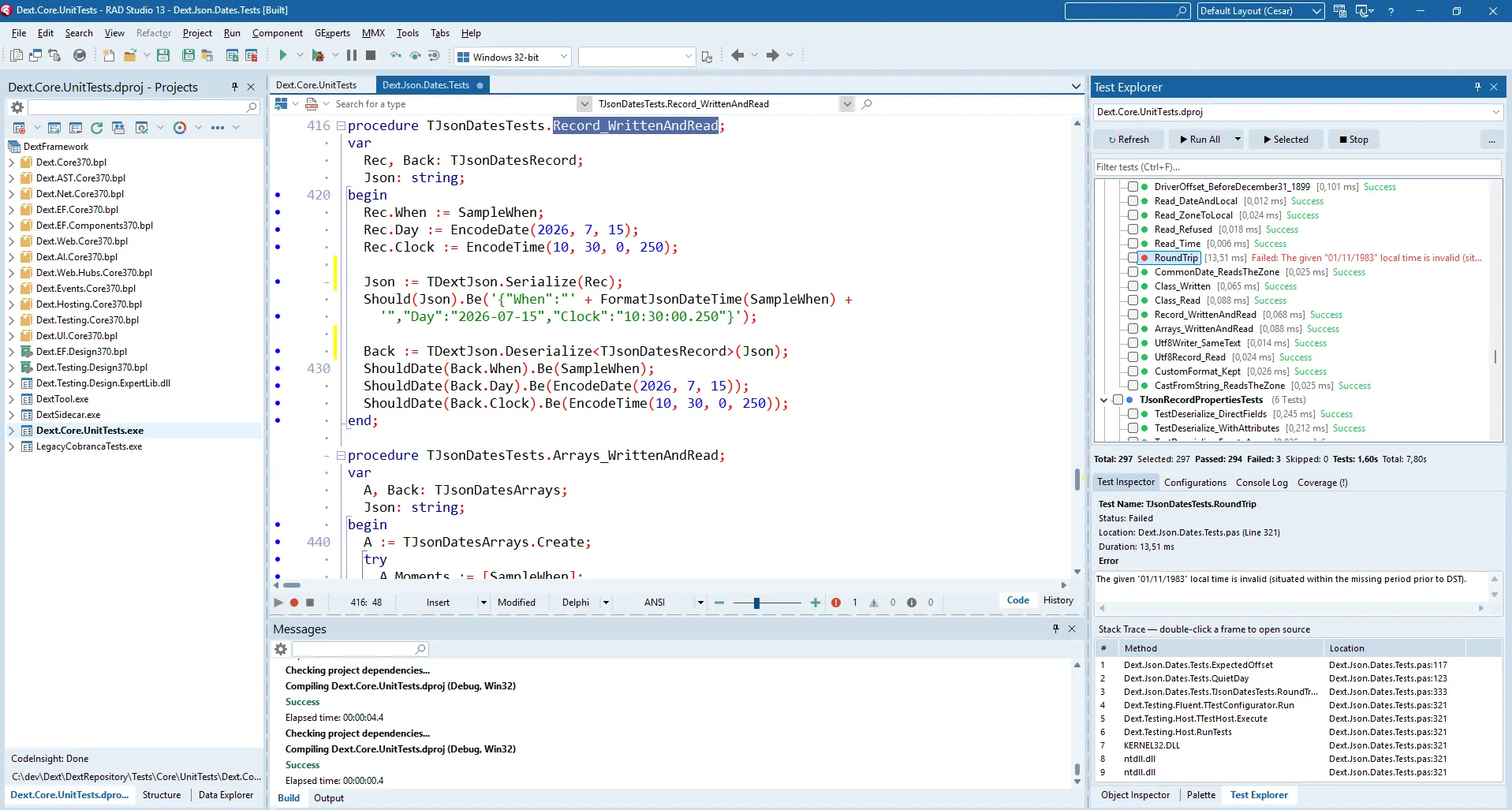
Section titled “2. Inside the IDE: The Dext Test Explorer”The developer experience lives inside RAD Studio. The Dext Test Explorer is a dockable Expert (IDE plug-in DLL) that automatically discovers test suites across Delphi and C++Builder projects.
Key capabilities of the Explorer:
- Asynchronous Execution: The IDE remains fully responsive. Test projects compile and run in the background, streaming events in real time over a lightweight local socket.
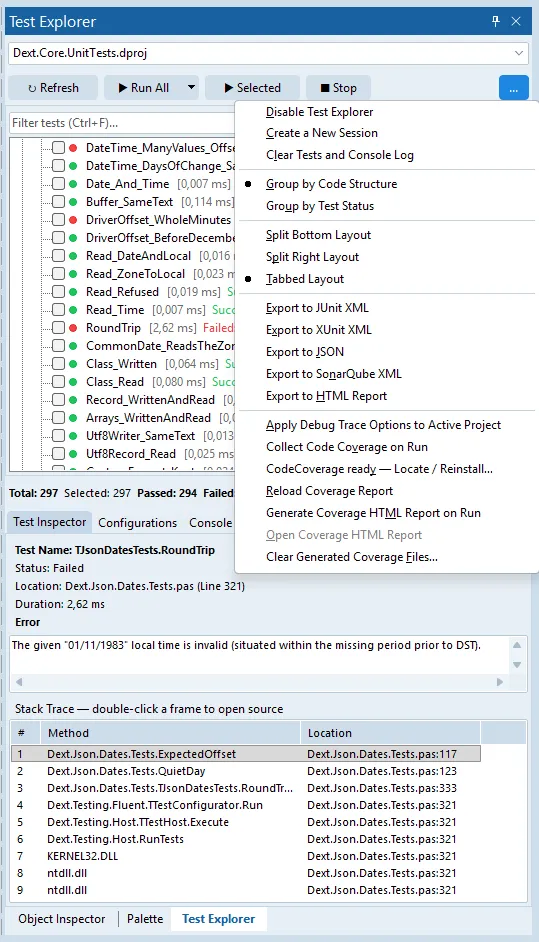
- Double-Click Stack Navigation: When a test fails, the complete stack trace is captured and parsed. A double-click on any stack frame immediately opens the source file at the exact failing line.
- Smart Filters and Flaky Test Detection: Filter effortlessly by passed, skipped, or failed tests, and view execution time trends across runs to identify unstable tests early.
- Zero Suite Rewrites: Built-in adapters allow legacy DUnit, DUnitX, and DUnit2 suites to run seamlessly in the same tree alongside modern Dext tests.
Gradual Adoption: You Don’t Need the Rest of Dext (Nor Suite Rewrites)
Section titled “Gradual Adoption: You Don’t Need the Rest of Dext (Nor Suite Rewrites)”A fundamental point must be emphasized: Dext Testing does not require your application to use the Dext Framework.
While Dext Testing is deeply integrated with the broader Dext ecosystem when available (sharing advanced dependency injection, auto-mocking, and web integration factories), it was engineered from day one for modularity and independence:
- For Any Existing Project: You can use Dext Testing to write unit tests for any conventional Delphi codebase—classic VCL applications, Windows services, console utilities, or legacy modules—without introducing any other Dext runtime dependencies to your production code.
- Modular Adoption in Slices: You can adopt only the specific tools that deliver immediate value to your current workflow. Want to keep your existing test fixtures but take advantage of the clarity and readable diagnostics of
Shouldfluent assertions? Or only need dynamic mocks viaDext.Mocks? These parts can be adopted in isolation. - The Test Explorer for DUnit, DUnitX, and DUnit2: If you already maintain hundreds or thousands of tests written in established frameworks, there is no need to rewrite a single line of test code to enjoy the new IDE experience. Simply include an integration adapter unit (such as
Dext.Testing.DUnitXorDext.Testing.DUnit) in your test project’s.dpr. The Dext Test Explorer immediately recognizes the existing suite, discovers fixtures, compiles asynchronously, and enables double-click failure navigation right into your editor.
3. The Game Changer: Code Coverage Directly in the Editor Gutter
Section titled “3. The Game Changer: Code Coverage Directly in the Editor Gutter”If there is one feature that fundamentally elevates day-to-day software design, it is in-IDE Code Coverage.
Historically, measuring line coverage in Delphi was a multi-step chore:
- Compile with detailed
.mapflags; - Run an external command-line tool;
- Wait for static HTML reports to generate on disk;
- Open a browser, drill down through folders, and hunt for red lines.
The Dext Test Explorer eliminates this friction entirely.
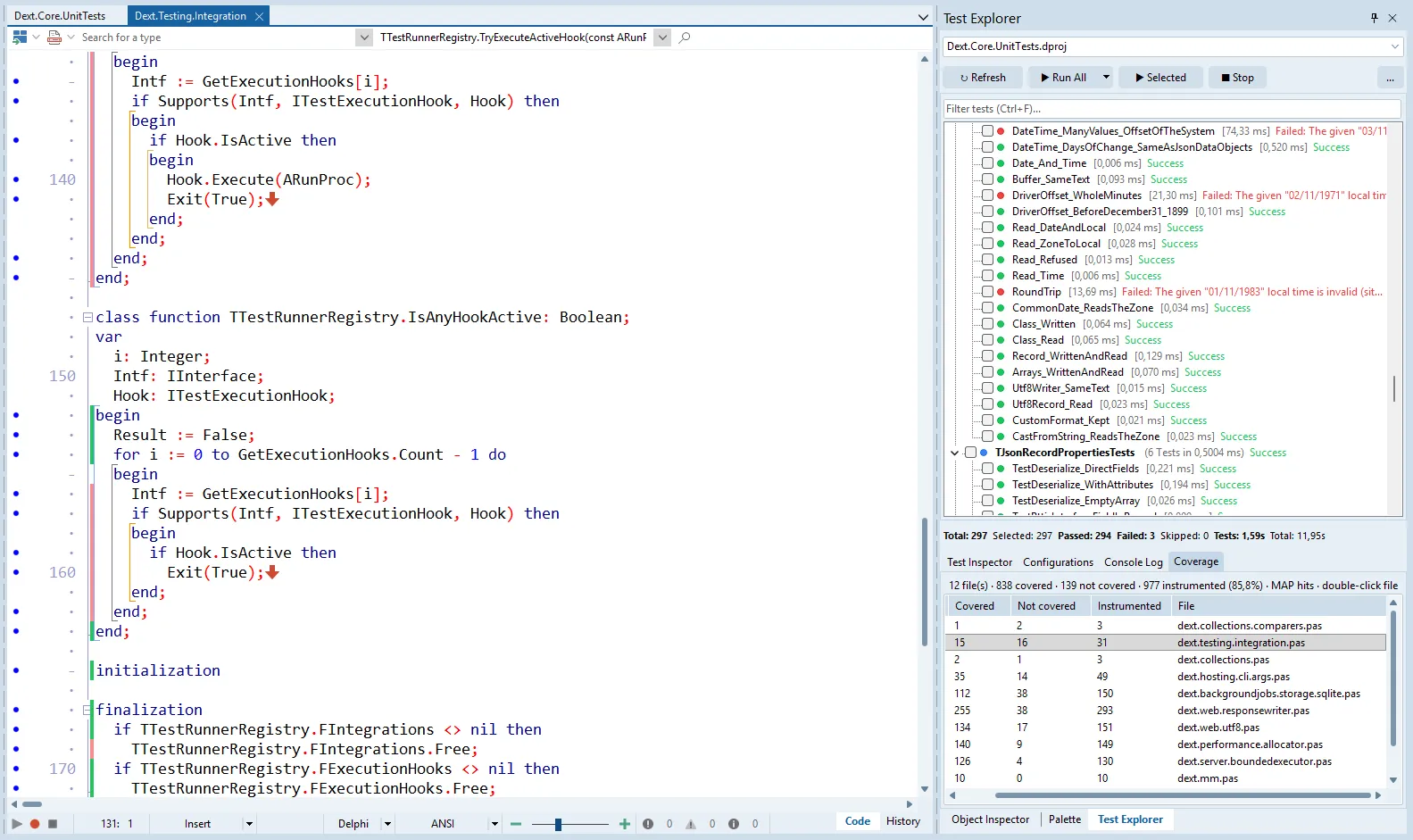
By toggling Collect coverage and running the suite:
- The Explorer handles coverage orchestration behind the scenes;
- The Coverage tab displays exact percentages by unit and method;
- The active code editor is painted in real time:
- Green: line executed by the test suite;
- Red: executable line untouched by any test;
- Yellow: conditional branch only partially covered.
You no longer have to guess whether an edge-case except block or branch was actually executed: glance at the editor gutter while writing or refactoring code.
The Solid Foundation: Acknowledging Delphi Code Coverage
Section titled “The Solid Foundation: Acknowledging Delphi Code Coverage”It is essential to highlight that Dext did not reinvent the wheel for binary inspection and map parsing. This milestone rests firmly on DelphiCodeCoverage, an established, community-driven open-source project that works flawlessly.
Dext recognizes the immense value of this tool and adopts it as the analysis engine that powers the entire workflow: Dext obtains the appropriate release automatically (requiring no manual setup or system path configuration), drives the DelphiCodeCoverage engine using the detailed .map file emitted by the compiler, and ingests the resulting data to paint the editor gutter and feed the statistics tab. It is the ideal pairing of a proven, robust analysis engine with a modern, native in-IDE user experience.
4. Introducing C++Builder: One Expert, Two Languages
Section titled “4. Introducing C++Builder: One Expert, Two Languages”RAD Studio is a dual-personality IDE, yet community tooling has historically skewed almost exclusively toward Delphi. We decided C++Builder developers deserved the exact same high-caliber testing experience.
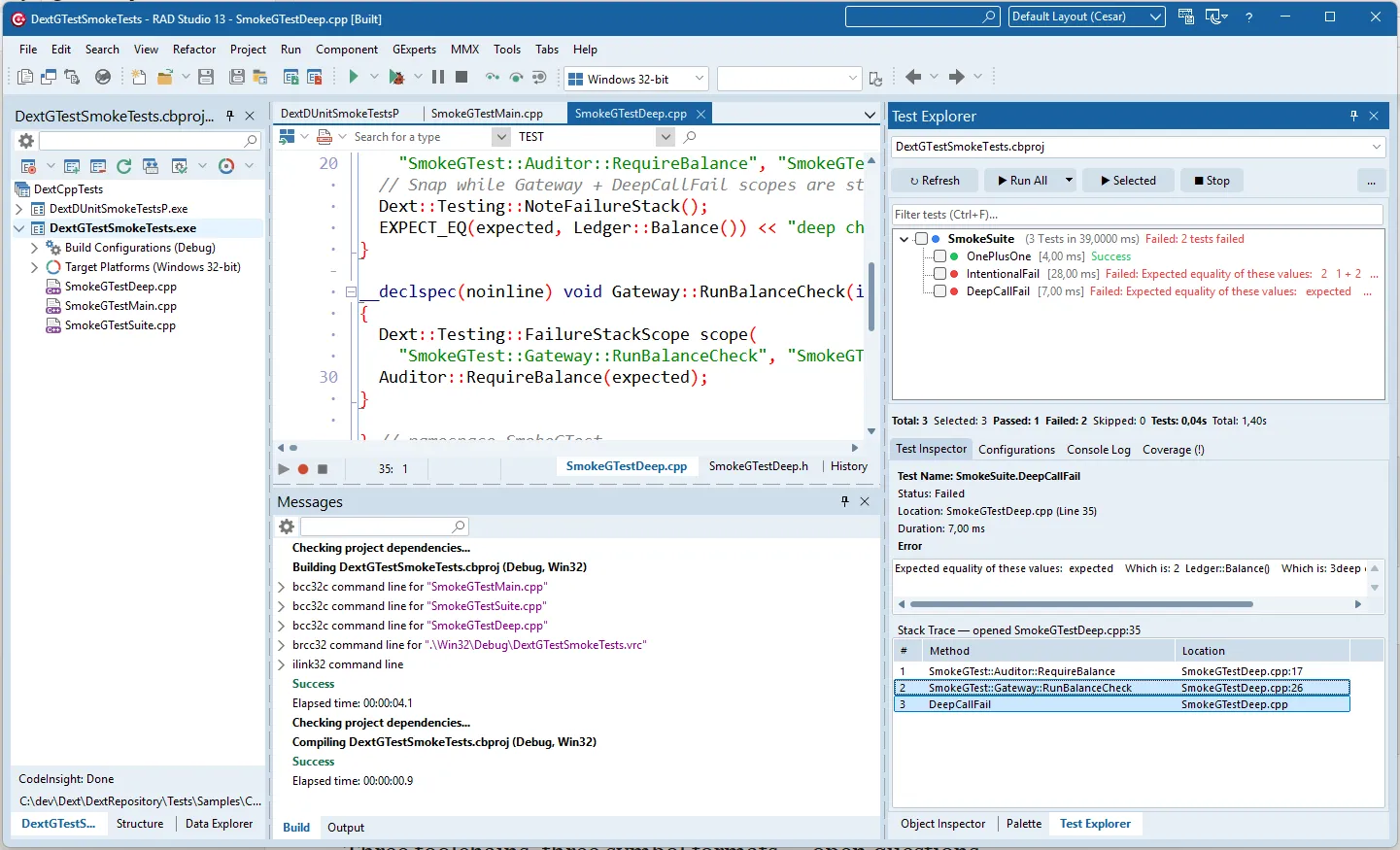
In this sprint, we extended the Test Explorer to natively understand .cbproj projects:
- Native Discovery: First-class support for both Google Test (GTest) and DUnit C++ suites;
- Symbolized Stack Traces: Detailed ILINK
.mapparsing resolves failing frames, allowing double-click navigation straight into.cppfiles; - Universal CI Export: Generates JUnit, xUnit, JSON, and SonarQube reports for CI/CD pipelines.
The C++Builder Code Coverage Journey
Section titled “The C++Builder Code Coverage Journey”Bringing line coverage to C++ presented distinct technical challenges. Unlike Delphi, where the linker outputs comprehensive line-number tables to .map files, C++Builder maps only contain functions and memory addresses.
Following deep analysis and technical discussions with Embarcadero engineering:
- For classic toolchains and Win32 Clang (
bcc32,bcc32c,bcc64), missing line tables prevent direct coverage collection without an invasive live profiler; - The breakthrough arrived on Modern Win64x (
bcc64x): The LLVM-based compiler supports compile-time profile instrumentation (-fprofile-instr-generate -fcoverage-mapping). When the test executes, it emits a.profrawfile, which is processed viallvm-covinto LCOV format. The Dext Test Explorer loads this LCOV and paints the exact same colored gutter markers on C++ source files!
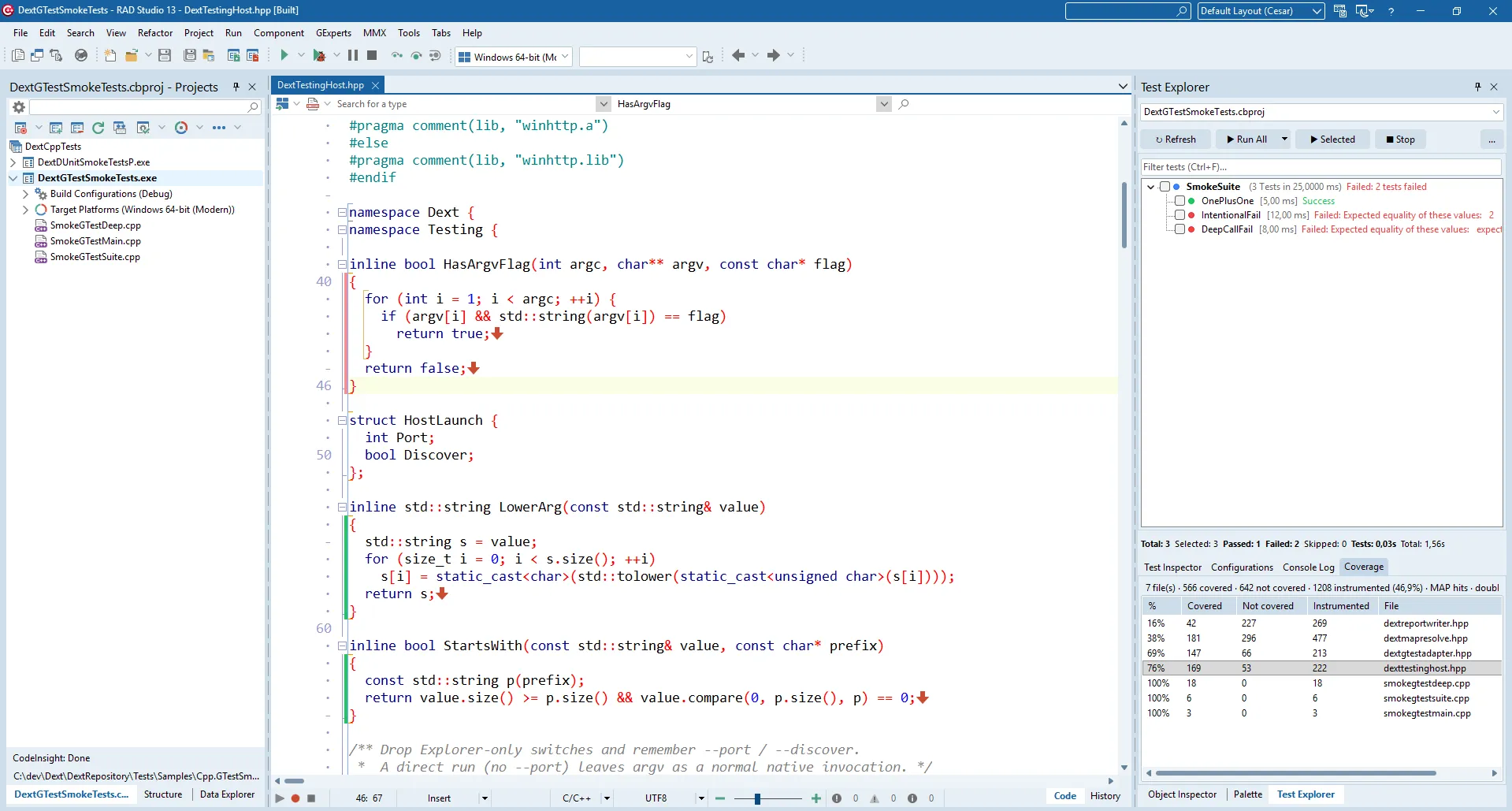
When running on Win64x, code coverage is seamless; on platforms lacking line data, the Explorer gracefully hides coverage options, providing honest and transparent feedback.
5. Built for CI/CD and Quality Gates
Section titled “5. Built for CI/CD and Quality Gates”Modern software engineering cannot rely on local machines alone. Dext Testing was engineered from day one to plug into continuous integration pipelines (GitHub Actions, GitLab CI, Azure DevOps, Jenkins).
Both via the CLI (dext test --coverage) and from the Test Explorer’s export menu, you can generate:
- JUnit XML / xUnit XML: parsed out-of-the-box by CI dashboards;
- TRX: native format for Visual Studio and Azure DevOps test runs;
- SonarQube XML (
dext_coverage.xml): directly feeding enterprise quality gates with coverage metrics; - HTML Reports: for quick visual reference in build artifacts.
6. Tools are 50%. Discipline is the Other Half: The Upcoming Book
Section titled “6. Tools are 50%. Discipline is the Other Half: The Upcoming Book”Great tools reduce friction, but they cannot prevent fragile suites, tests tightly coupled to implementation details, or bloated, untestable architectures.
Following the recent release of Professional Web Development with Delphi and Dext Framework (published in Portuguese and English)—which kicked off our technical series on modernizing Delphi architectures—I am thrilled to announce that the complete first draft of the second volume is ready:
Professional Unit Testing with Delphi and Dext Framework
Section titled “Professional Unit Testing with Delphi and Dext Framework”Principles, TDD, Isolation, and Suites that Survive Refactoring
(Portuguese Edition: Testes Unitários Profissionais com Delphi e Dext Framework)
Distilled from more than two decades of Delphi engineering combined with extensive experience in the .NET ecosystem, this book goes far beyond syntax. It teaches the discipline, craft, and architecture of testing software in Object Pascal.
The book comprises 22 chapters organized into four progressive parts, each ending with a practical hands-on lab:
Part I — Mindset and the First Test
Section titled “Part I — Mindset and the First Test”Examine the true cost of untested code and demystify unit testing in Pascal. Master the AAA (Arrange-Act-Assert) pattern, craft expressive test names that serve as living documentation, and write semantic assertions that make failures clear and actionable.
- Lab 1: Designing your first rock-solid domain suite.
Part II — Tests that Survive Refactoring
Section titled “Part II — Tests that Survive Refactoring”Why do so many test suites break during routine refactoring? We explore the four pillars of a good unit test, compare the Classical (Detroit) and Mockist (London) schools, identify common test smells, and structure fixtures and test data to avoid state leakage and memory issues.
- Lab 2: Refactoring and stabilizing a fragile suite.
Part III — TDD, Isolation, and Emergent Design
Section titled “Part III — TDD, Isolation, and Emergent Design”Experience Test-Driven Development (TDD) through realistic scenarios. Discover how software design emerges naturally from tests, master the five test double types (Dummy, Stub, Spy, Mock, Fake), and leverage Dext.Mocks with argument matching, call verification, and DI auto-mocking.
- Lab 3: Building a production business module test-first.
Part IV — Legacy Code, Reports, Coverage, and Daily Practice
Section titled “Part IV — Legacy Code, Reports, Coverage, and Daily Practice”Real-world enterprise systems are rarely greenfield. Learn to identify seams in legacy Pascal codebases, write characterization tests to preserve legacy behaviors, integrate the Dext Test Explorer, and publish SonarQube quality metrics to corporate pipelines.
- Lab 4: The production-ready test suite you take to work on Monday.
7. Technical Transparency and Ground Truth
Section titled “7. Technical Transparency and Ground Truth”As with everything in the Dext ecosystem, honest communication is paramount:
- What is Stable: The core testing framework (
Dext.Testing),Shouldassertions, dynamic mocks (Dext.Mocks), snapshots, DUnit/DUnitX adapters, web integration tests (TDextApplicationFactory), and the CLI runner with CI reports. - What is Evolving: The Test Explorer IDE Expert and in-editor coverage gutter continue to receive UX and stability polish.
- C++Builder Status: Test execution and stack traces work across Win32 and Win64x. In-editor gutter line coverage is currently supported on the modern Win64x compiler via LLVM 20.
- Distribution: The Expert is available via source code and automated installation scripts. Our future roadmap includes publishing 1-click install packages on the RAD Studio GetIt package manager.
8. Get Started Today
Section titled “8. Get Started Today”You can start exploring Dext Testing, building the Test Explorer, and running it in your own projects today:
- Official Repository: Visit the project on GitHub at github.com/dotpas/dext.
- Installing the Dext Framework: The framework is readily available through popular Delphi package managers:
- TMS Smart Setup
- DPM (Delphi Package Manager)
- Installing the Test Explorer: To build and register the Expert in your RAD Studio environment today, follow the step-by-step instructions in Dext Test Explorer — Build & Install Guide.
- Coming Soon to GetIt: The Test Explorer will soon be published as a pre-compiled package on the GetIt Package Manager for effortless 1-click installation—especially convenient for developers working solely in C++Builder who want the Test Explorer without downloading the entire Dext Framework.
- Ready-to-Run Samples: Explore the sample suites in
Tests/Samples/, including Delphi suites, legacy DUnitX projects, and both DUnit and Google Test projects for C++Builder. - Stay Tuned for the Book: Pre-order details and preview chapters for Professional Unit Testing with Delphi and Dext Framework will be announced soon on my official website and social media.
Unit testing in Delphi and C++Builder no longer has to be a source of frustration or a patchwork of disconnected tools. With Dext Testing, our community gains the modern, robust, and joyful development workflow it has long deserved.
Have questions, suggestions, or want to share your experience? Open an issue or join the conversation in the GitHub discussions. Every contribution helps strengthen the culture of engineering and quality across the Delphi and C++Builder community!