The Definitive Guide to Unit Testing with Dext: Quality, Abstraction, and the Dext Test Explorer Revolution
Modern software engineering demands reliability. However, for decades, writing tests in Delphi required a herculean internal configuration effort. Although the community has excellent .NET-inspired initiatives—which paved the way to where we are—developers still had to manually stitch together different assertion libraries, mock engines, and runners to get a complete environment. This integration friction and the lack of a unified design-time experience ended up discouraging many teams from adopting a testing routine.
The Dext Testing Framework was developed specifically to break down this barrier. Inspired by the best practices and established libraries of the .NET ecosystem (such as MSTest 2, NUnit, xUnit, Moq, and Fluent Assertions), Dext brings a unified, robust testing suite to Delphi, with a core that is entirely free of external dependencies and offers exceptional performance.
In this complete guide, we will deeply explore the design concepts behind the framework, detail each of its features, and introduce the new Dext Test Explorer IDE Expert, the ultimate visual tool for developer productivity in RAD Studio.
1. The Dext Manifesto: Quality, Isolation, and Abstraction
Section titled “1. The Dext Manifesto: Quality, Isolation, and Abstraction”Writing tests is not just about verifying if 1 + 1 = 2. A true unit test is a software design tool. It forces the developer to write decoupled code that adheres to SOLID principles.
The SUT (System Under Test) and Isolation Paradigm
Section titled “The SUT (System Under Test) and Isolation Paradigm”In a pure unit test, we test a single class (the SUT - System Under Test) in complete isolation. Any external dependency (database, network calls, or services) must be isolated using Mocks, Stubs, or Fakes.
- Guaranteed Isolation: If the test fails, you know exactly which unit of code failed. There are no false negatives caused by an unstable network or missing database records.
- Abstraction and Coupling Flexibility: To allow isolation, the SUT should ideally consume abstractions (interfaces). Dext makes mocking these interfaces as natural as declaring a variable. However, aware that legacy systems or existing architectures cannot always be refactored to interfaces immediately, Dext Testing goes further and offers native support for mocking concrete classes (by overriding virtual methods). This guarantees total flexibility to isolate dependencies even under more rigid coupling structures.
2. The Bridge to .NET: A Consolidated Stack
Section titled “2. The Bridge to .NET: A Consolidated Stack”In the .NET ecosystem, developers use a combination of libraries to achieve a complete testing experience:
- xUnit / NUnit: For the test runner and structuring fixtures.
- Moq / NSubstitute: For mocking dependencies and verifying calls.
- Fluent Assertions: For readable and expressive assertions.
In classic Delphi, achieving this result would require installing DUnitX, integrating Delphi-Mocks, and searching for third-party fluent assertion libraries—which frequently generates compatibility conflicts, heavy dependency coupling, and an inconsistent development experience.
Dext Testing unifies this entire stack natively. By consolidating the equivalents of multiple distinct frameworks from the .NET ecosystem (such as runners, mock libraries, fluent assertions, and snapshot engines) into a single cohesive solution, we completely eliminate the classic friction of trying to integrate packages from different authors.
All features of Dext Testing were designed from day one to work in perfect harmony and be fully integrated. This means that test declarations with attributes, mock creation, assertions using Should, and report exports share the same internal infrastructure and conventions. There is no need for adapters, workarounds, or complex configurations. This native synergy simplifies the learning curve, ensures maximum execution efficiency and compilation optimization, and allows for a natural, integrated evolution of the entire test suite.
Here is how Dext features compare to .NET giants:
| Feature / Concept | .NET Ecosystem | Dext Testing Equivalent | Dext Advantage |
|---|---|---|---|
| Defining Fixtures | [TestClass] (MSTest) / [TestFixture] (NUnit) | [TestClass], [TestFixture] | Allows creating pure PODO test classes, eliminating mandatory inheritance (like the classic TTestCase in DUnit). |
| Assertions | fluent.Should().Be(...) (Fluent Assertions) | Should(Value).Be(...) | Highly fluent syntax with chaining. |
| Mocking | new Mock<T>() (Moq) | Mock<T>.Create | Automatic lifecycle management (Records instead of Classes), eliminating memory leaks in tests. |
| Auto-Mocking | AutoMocker (Moq.AutoMocker) | TAutoMocker | Automatic SUT instantiation resolving constructors with pre-configured Mocks. |
| Data-Driven Tests | [Theory] (xUnit) / [TestCase] (NUnit) | [Test], [TestCase], [TestCaseSource] | Native parameterized tests that support fuzzing with [Random], [Range], and [Values]. |
| Snapshot Testing | Snapshooter / Verify | MatchSnapshot | Native, automatically saving complex structures like JSON to a snapshots folder. |
| Code Coverage | Coverlet / dotnet-coverage | dext.exe --coverage | Native via CLI (HTML/XML reports) and soon integrated directly into the IDE Test Explorer UI. |
| IDE Runner | Test Explorer (Visual Studio) | Dext Test Explorer (RAD Studio Expert) | Seamless integration with RAD Studio, offering an interactive tree, grouping, error inspector, and exports. |
3. Technical Feature Reference Guide
Section titled “3. Technical Feature Reference Guide”Let’s explore in detail how to use each Dext feature with practical code examples.
3.1. RTTI-Based Runner (PODO Test Fixtures)
Section titled “3.1. RTTI-Based Runner (PODO Test Fixtures)”Say goodbye to the need to inherit your test classes from TTestCase or TDephiTestCase. In Dext, any common Delphi class (PODO - Plain Old Delphi Object) can contain tests, as long as it is decorated with attributes.
unit Dext.Core.UnitTests;
interface
uses  Dext.Testing;
type  [TestFixture]  [Category('Business')]  TDiscountServiceTests = class  private    FService: IDiscountService;  public    [Setup]    procedure Setup;
    [TearDown]    procedure Cleanup;
    [Test]    [Description('Validates if standard customer without coupon receives no discount')]    procedure TestNoDiscountForStandardUser;
    [Test]    // Parameters: Subtotal, IsVip, Coupon, ExpectedDiscount    [TestCase(100.0, False, '', 0.0)]    [TestCase(100.0, True, '', 10.0)]    [TestCase(200.0, False, 'BLACKFRIDAY', 30.0)]    procedure TestDiscountRules(const Subtotal: Double; const IsVip: Boolean; const Coupon: string; const ExpectedDiscount: Double);  end;
implementation
procedure TDiscountServiceTests.Setup;begin  FService := TDiscountService.Create;end;
procedure TDiscountServiceTests.Cleanup;begin  FService := nil;end;
procedure TDiscountServiceTests.TestNoDiscountForStandardUser;begin  var Discount := FService.CalculateDiscount(50.0, False, '');  Should(Discount).Be(0.0);end;
procedure TDiscountServiceTests.TestDiscountRules(const Subtotal: Double; const IsVip: Boolean; const Coupon: string; const ExpectedDiscount: Double);begin  var Discount := FService.CalculateDiscount(Subtotal, IsVip, Coupon);  Should(Discount).Be(ExpectedDiscount);end;
end.
Runner Lifecycle Attributes:
Section titled “Runner Lifecycle Attributes:”[Setup]: Executed before each test in the class.[TearDown]: Executed after each test in the class.[BeforeAll]/[ClassInitialize]: Executed once before any test in the class runs.[AfterAll]/[ClassCleanup]: Executed once after all tests in the class finish.[AssemblyInitialize]: Executed once upon Test Runner initialization.[AssemblyCleanup]: Executed once upon Test Runner shutdown.
Execution Control and Resilience:
Section titled “Execution Control and Resilience:”[Ignore('Reason')]: Skips the test, providing an explanation that appears in reports and the IDE.[Timeout(Milliseconds)]: Cancels and fails the test if execution exceeds the specified timeout.[Repeat(N)]: Executes the testNconsecutive times. Excellent for detecting flaky tests and race conditions.[MaxTime(Milliseconds)]: The test passes if the logic is correct, but generates a warning in reports if it takes longer than the allowed limit (useful for detecting performance regressions).[Explicit]: The test only runs if explicitly selected by the user (useful for slow integration tests).[Platform('Win64')]: Restricts test execution to specific architectures.
3.2. Fluent Assertions (Should Syntax)
Section titled “3.2. Fluent Assertions (Should Syntax)”Dext’s fluent assertions significantly increase test readability. The structure of the code resembles an English sentence, facilitating code review.
// Fluent chaining with .And / .AndAlsoShould(Name).StartWith('Jo').AndAlso.EndWith('ao').And.NotBe('John');
// Numeric valuesShould(Count).BeGreaterThan(0);Should(Value).BeInRange(1, 100);
// Assertions for Dext native GUID and UUIDShould(RecordGuid).NotBeEmpty;
// Lists and CollectionsShould(UserList).HaveCountLessThan(10);Should(UserList).Contain(AdminUser);Should(UserList).BeEquivalentTo(ExpectedList); // Compares items ignoring order
// Elegant Exception handlingShould(procedure  begin    FService.CalculateDiscount(-10.0, False, ''); // Throws exception if value is negative  end).Throw<EArgumentOutOfRangeException>();
Soft Assertions (Assert.Multiple)
Section titled “Soft Assertions (Assert.Multiple)”By default, an error in an assertion immediately halts test execution. With Assert.Multiple, you can group multiple assertions. The Runner will execute all of them and report in detail which ones failed at the end of the block.
Assert.Multiple(procedure begin Should(User.Name).Be('Maria'); Should(User.Age).Be(28); Should(User.Email).Contain('@company.com'); end);Property Accessors (WhichString, WhichInteger, etc.)
Section titled “Property Accessors (WhichString, WhichInteger, etc.)”Allows accessing properties of sub-objects safely and fluently without breaking the assertion chain:
Should(Order) .NotBeNil .HaveProperty('Customer').WhichObject .HaveProperty('Name').WhichString .StartWith('Enterprise');Smart Entities (Avoiding Magic Strings)
Section titled “Smart Entities (Avoiding Magic Strings)”To avoid using magic strings when testing object properties, Dext provides Prototype.Entity<T> to extract strongly typed metadata from properties:
var u := Prototype.Entity<TUser>;Should(CurrentUser).HaveValue(u.Email, 'suporte@dext.dev');3.3. The Powerful Mocking Engine
Section titled “3.3. The Powerful Mocking Engine”Unlike .NET, Delphi does not have native Expression Trees. To solve this with elegance and strong typing, Dext implements an architecture based on Proxy-Recording (Setup...When.MethodCall).
[!IMPORTANT] Dext’s
Mock<T>is implemented as a Generic Record. This means it lives on the stack and does not require manual release (.Free). The mock interface instance is automatically destroyed according to Delphi’s reference counting rules.
💡 The Managed Lifecycle of Mock
Traditional testing frameworks often require extra care with memory management of mock instances. Dext solves this pain by implementing Mock
using Managed Records and native reference counting. The Mock is born and dies respecting the scope of the test method allocated on the stack, eliminating the need for manual try..finally blocks just to release the testing infrastructure. It is the sophistication of modern Object Pascal engineering working to keep code clean.
uses  Dext.Mocks;
type  {$M+} // Required to enable extended RTTI on the interface  IPaymentService = interface    ['{8F4E6B20-562F-4DFA-A39B-C53805D7AAEC}']    function ProcessPayment(const CardNum: string; const Amount: Double): Boolean;    function GetTransactionCount: Integer;  end;  {$M-}
procedure TOrderTests.TestOrderPayment;begin  // 1. Mock Creation  var MockPayment := Mock<IPaymentService>.Create;
  // 2. Behavior Setup (Returns true for any card number and amount)  MockPayment.Setup    .Returns(True)    .When    .ProcessPayment(Arg.Any<string>, Arg.Any<Double>);
  // 3. Sequence Setup (returns different values for subsequent calls)  MockPayment.Setup    .ReturnsInSequence([1, 2, 3])    .When    .GetTransactionCount;
  // 4. Executing the SUT with the injected mock (.Instance provides the physical interface)  var OrderProcessor := TOrderProcessor.Create(MockPayment.Instance);  try    var Success := OrderProcessor.Checkout('1234-5678', 150.00);
    // Assertion    Should(Success).BeTrue;  finally    OrderProcessor.Free;  end;
  // 5. Call verification (Behavioral assertions)  MockPayment.Received(Times.Once).ProcessPayment('1234-5678', 150.00);  MockPayment.DidNotReceive.ProcessPayment(Arg.Is<string>(function(S: string): Boolean    begin      Result := S.StartsWith('0000'); // Guarantees that no invalid card was sent    end), Arg.Any<Double>);
  // Ensures no other unexpected calls were made besides verified ones  MockPayment.VerifyNoOtherCalls;end;
Class Mocking (Partial Mocks/Spies)
Section titled “Class Mocking (Partial Mocks/Spies)”Dext also allows mocking virtual methods of concrete classes and configuring partial behavior (redirecting unconfigured calls to the base class):
var MockRepo := Mock<TUserRepository>.Create;MockRepo.CallsBaseForUnconfiguredMembers := True; // Spy behavior
MockRepo.Setup.Returns(MockedUser).When.FindById(99);// FindById(99) returns MockedUser. Other IDs will invoke the actual logic of TUserRepository.
3.4. Auto-Mocking Container (TAutoMocker)
Section titled “3.4. Auto-Mocking Container (TAutoMocker)”Managing dependencies manually in complex tests can generate a massive amount of boilerplate setup code. TAutoMocker automates this by inspecting the constructors of the class under test, creating the necessary mocks, and injecting them automatically.
procedure TUserTests.TestUserRegistration;begin  var Mocker := TAutoMocker.Create;
  // AutoMocker silently creates the mock for IUserRepository and IEmailService  // and injects them into the constructor parameters of TUserService  var UserService := Mocker.CreateInstance<TUserService>;  try    // We can retrieve the created mock and configure behavior    Mocker.GetMock<IUserRepository>.Setup      .Returns(True)      .When      .Save(Arg.Any<TUser>);
    UserService.Register('John Doe', 'john@dext.dev');
    // Verifies if the welcome email was sent    Mocker.GetMock<IEmailService>.Received(Times.Once).SendWelcomeEmail('john@dext.dev');  finally    UserService.Free;    Mocker.Free;  end;end;
3.5. Snapshot Testing (MatchSnapshot)
Section titled “3.5. Snapshot Testing (MatchSnapshot)”When testing complex responses (like large JSON payloads generated by a serialization service), manual assertions can become impractical. Snapshot Testing saves the complete state of the object in a reference JSON file and validates future executions against it.
[Test]procedure TestComplexReportGeneration;begin  var Report := FReportService.Generate(2026, 'Sales');
  Report.MatchSnapshot(procedure(Options: TSnapshotOptions)    begin      // Ignores dynamically generated fields like timestamps or random IDs      Options.IgnorePaths([        '$.Metadata.GeneratedAt',        '$.Metadata.TraceId'      ]);    end);end;
To update reference files when a change in behavior is intentional, simply run the runner via CLI:
dext test --update-snapshots3.6. Code Coverage
Section titled “3.6. Code Coverage”What is the use of having thousands of tests if they only cover an insignificant fraction of the system? Code Coverage is the metric that indicates which lines of your product’s code were executed during a unit test run.
Today, Dext provides native support for code coverage through its CLI utility, dext.exe.
By running in the terminal:
dext test --coverageThis functionality is enabled through Dext’s transparent integration with the community open-source tool Delphi Code Coverage (https://github.com/DelphiCodeCoverage/DelphiCodeCoverage). The dext.exe utility automates the entire process, including the option to download the latest release directly from the tool’s official repository if it is not present on the machine.
Dext coordinates the tool’s execution and consolidates the generation of detailed coverage reports, exportable in formats such as HTML and XML (fully compatible with SonarQube to compose pipeline Quality Gates).
🚀 Next Step: Integrated IDE Coverage
Section titled “🚀 Next Step: Integrated IDE Coverage”To further elevate the design-time experience (Design-Time DX), we are integrating Code Coverage directly into the visual interface of the Dext Test Explorer in RAD Studio.
With this integration, developers will be able to run coverage analysis with one click and view the coverage percentage of classes directly in the test tree, as well as color-coded highlights of executed and unexecuted lines right inside the IDE code editor, eliminating the need for manual exports or external checks during development.
3.7. The Continuous Integration (CI/CD) Ecosystem and Quality Gates
Section titled “3.7. The Continuous Integration (CI/CD) Ecosystem and Quality Gates”In modern software development, quality is not delegated only to the end of the development cycle. It is validated continuously with every commit. This is where the concept of Quality Gates comes in.
What is a Quality Gate and why does it save businesses?
Section titled “What is a Quality Gate and why does it save businesses?”A Quality Gate is a set of automated conditions and metrics that a piece of code must satisfy before being integrated into the main branch or promoted to production. It evaluates:
- Successful execution of 100% of unit and integration tests.
- Minimum tested code coverage (e.g., 80%).
- Absence of security vulnerabilities and critical bugs detected by static analysis.
The Cost of a Bug in Production:
According to classic Software Engineering rules, a bug found during the coding phase costs 1x. If it passes to the manual/QA testing phase, it costs 10x. If it reaches production, the cost jumps to 100x or more. In mission-critical ERP systems written in Delphi (which manage billing, tax emission, accounting, and stocks), a critical bug in production can paralyze the operations of hundreds of corporate clients, resulting in contractual fines, massive financial losses, and irreparable damage to the software house’s reputation.
How Dext Enables a Culture of Quality in Delphi
Section titled “How Dext Enables a Culture of Quality in Delphi”Traditionally, the Delphi community faced difficulties integrating tests from legacy projects into CI/CD tools due to a lack of report formats compatible with market analyzers.
Dext solves this natively by acting as a multi-format report generator. With the Dext Fluent API, you configure exporters that write test results in the standards required by the market’s main DevSecOps tools:
if TTest.Configure .Verbose .RegisterFixtures([TDiscountServiceTests, TUsuarioServiceTests]) .ExportToJUnit('results-junit.xml') // Standard for GitHub Actions, Jenkins, and GitLab CI .ExportToXUnit('results-xunit.xml') // Standard for the .NET ecosystem .ExportToTRX('results.trx') // Native format for seamless integration with Azure DevOps .ExportToJson('report.json') // Useful for custom audit scripts .ExportToSonarQube('sonar-generic.xml') // Direct integration with SonarQube Quality Gates .ExportToHtml('dashboard.html') // Self-contained static report with statistical charts .Run then ExitCode := 0else ExitCode := 1;Other Resources and Practical Integration with Market Tools:
Section titled “Other Resources and Practical Integration with Market Tools:”- SonarQube: When generating the
sonar-generic.xmlfile, the SonarQube scanner reads success, failure, and skip results from Dext, integrating this data directly into Pull Request blocking rules on the Code Review platform. - Azure DevOps: The
.trxformat is the official standard of the Microsoft ecosystem. When using it, the Azure Pipelines panel automatically renders native charts showing test progress, time spent, and build stability history. - GitHub Actions / GitLab CI / Jenkins: Using the classic JUnit XML format, any build runner detects terminal failures, prevents the automatic deployment of broken code, and sends immediate alerts to the team.
3.8. Live Dashboard (Evolution Roadmap)
Section titled “3.8. Live Dashboard (Evolution Roadmap)”Dext Testing brings support for a Live Dashboard based on an embedded HTTP server and Server-Sent Events (SSE) to provide a rich visualization and a real-time timeline of test execution.
[!NOTE] Live Dashboard Status and Next Steps:
The initial version of the dashboard is available but has been temporarily commented out and disabled in default installer configurations (TMS Smart Setup) to avoid compilation-time resource conflicts (linked to the.resfile integrated into units compiled in multiple projects). We are working on a new version that will definitively resolve these packaging limitations and add even more advanced test telemetry features.
4. The Dext Test Explorer Revolution
Section titled “4. The Dext Test Explorer Revolution”The biggest new feature in the latest version of Dext is the Dext Test Explorer, a high-level native Expert (plugin) integrated directly into RAD Studio. It brings the fluid visual experience of Visual Studio’s Test Explorer directly to the Delphi environment, replacing classic implementations with a rich and modern UI.
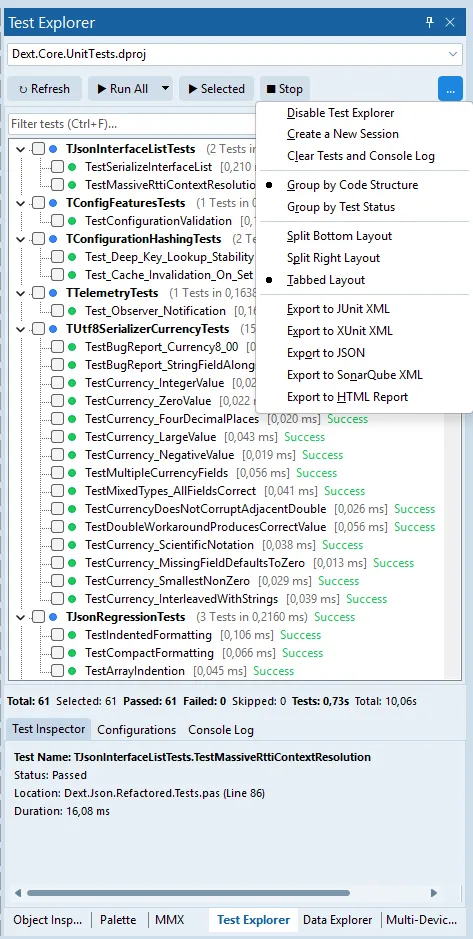
The Dext Test Explorer interface integrated in RAD Studio.
Main Test Explorer Features:
Section titled “Main Test Explorer Features:”- Multiple Test Project Support (Project Group): Dext Test Explorer allows managing multiple unit test projects within the same Project Group (
.groupproj) loaded in the IDE. The developer selects which test project to focus on via an intuitive combobox at the top of the interface. This allows working in an isolated and modularized way. In large codebases (with hundreds or thousands of tests), it avoids the slowness of recompiling and linking a giant executable for every change, letting you compile and run only the selected project, drastically reducing feedback time. - Dynamic Test Tree with Ultra-Fast Parser: Inspects the active selected test project, automatically discovering Fixtures and Tests via RTTI. The internal load parser has been extensively optimized for instant performance: even in complex projects with more than 1000 test cases, loading and mapping in the tree occur almost immediately in the IDE. In our practical benchmarks (visible in the real IDE interface reproduced below), the Dext engine executed a suite of 61 complex serialization unit tests in less than 1 second of pure computational time (exactly 0.73s). The status bar also displays, with full transparency, the total cycle time (10.06s), which encompasses the complete IDE roundtrip: compilation, linking, and process loading. Having this level of visual feedback without having to leave the text editor is what keeps the developer focused and productive. It allows filtering and searching tests in real-time as you type.
- Flexible Grouping Modes:
- Group by Code Structure: Organizes tests following the logical structure of Units and Classes/Fixtures.
- Group by Test Status: Groups by Passed, Failed, Skipped, and Idle (not executed).
- Customizable Layouts:
- Tabbed Layout: Allows organizing the interface in clean tabs.
- Split Layouts (Bottom/Right): Splits the screen to display console logs and the test tree side-by-side with the IDE code editor.
- Test Inspector Tab: Displays detailed information of the selected test, including full name, execution status, precise duration, and exact physical location (unit and line). Double-clicking a test takes the cursor directly to the corresponding code in the RAD Studio editor.
- Settings and Automation Tab: Dedicated panel to customize the test execution experience:
- Custom Command Line Parameters: Allows passing custom command-line parameters to the test runner (such as advanced filters
--filter mytest*or--verbosemode). - Run tests automatically on Save: Runs the test suite automatically whenever a project file is saved in the IDE.
- Run tests automatically on Idle: Executes tests asynchronously when the IDE detects developer inactivity (Continuous Testing).
- Enable Dext Test Explorer: Global switch to quickly enable or disable active integration of the plugin.
- Custom Command Line Parameters: Allows passing custom command-line parameters to the test runner (such as advanced filters
- Integrated Console Log: Dedicated tab for direct visualization of
Stdoutand logs generated during test runs. - Analytical Status Bar: Aggregated statistics at the bottom displaying: Total, Selected, Passed, Failed, Skipped, Test Execution Time, and Global Execution Time.
- Visual Report Export Menu (
...):- Instant one-click export to JUnit XML, xUnit XML, JSON, SonarQube XML, and HTML Report.
- Integrated Code Coverage (Coming Soon): Execution of Code Coverage analysis with one click directly through the Test Explorer, providing visual reports of coverage percentage and coloring executed lines directly in the IDE code editor.
4.1. Legacy Support and Community Ecosystems: DUnit, DUnit2, and DUnitX
Section titled “4.1. Legacy Support and Community Ecosystems: DUnit, DUnit2, and DUnitX”We know that migrating an entire corporate system’s test base at once to a new suite is unfeasible. Aware of this, Dext Test Explorer was born prepared to respect and value the existing Delphi community ecosystem.
The Expert brings initial native support to execute legacy and modern tests written in:
- DUnit: The pioneer and classic framework based on JUnit.
- DUnit2: The evolution focused on structural improvements of classic DUnit.
- DUnitX: The most widely adopted modern test framework today, inspired by .NET concepts.
When mapping the test tree of your Project or Project Group, Dext Test Explorer discovers and executes these classic suites transparently and asynchronously, displaying results in the same unified visual panel. We are fully available to help anyone wishing to try and use these integrations in their projects; if you find any issues, difficulties, or unexpected behavior, please let us know so we can help and evolve the tool together.
Field-Tested with Open-Source Projects
Section titled “Field-Tested with Open-Source Projects”To prove the power and maturity of Dext Test Explorer’s integration with community tools, we performed complete execution and validation of unit test suites from major open-source projects in the Delphi ecosystem.
The tests of these suites, running under the DUnitX structure, were loaded and executed by Dext Test Explorer directly, without any need for adaptations or intermediary tools. The result was instant visual feedback of passing tests in design time—demonstrating that Dext does not want to isolate the developer, but rather unite the classic ecosystem with a modern and professional visual experience.
5. The Next Horizon: A Vision for RTL and IDE Evolution
Section titled “5. The Next Horizon: A Vision for RTL and IDE Evolution”More than just delivering a ready-made suite, developing Dext Testing has brought us deep clarity about the future of the Object Pascal ecosystem. For quality culture to become the absolute standard in the Delphi industry, we need to discuss how testability can be integrated natively and pluggably into the core of the platform.
Modern engineering would gain unprecedented traction if official RTL and RAD Studio tools were born ready for code isolation. Imagine the impact of having:
- Native Testable Abstractions: Simplified, pluggable mocks and stubs for critical components like FireDAC, WebBroker, DataSnap, and the new WebStencils engines. Testing a business rule that interacts with a web request or database transaction shouldn’t require developers to build heavy workaround layers.
- Decoupled I/O Interfaces: File read/write and network communication primitives that support native dependency injection in the RTL, facilitating SUT (System Under Test) isolation.
- An Open Tools API (OTA) Focused on Continuous Testing: The IDE extensibility infrastructure could evolve to allow Experts to execute test suites completely asynchronously and in the background, highlighting failures or uncovered lines smoothly and visually directly in the code editor’s gutter (the side margin). The developer would know they broke a test the exact second they save the file, without code typing focus or the RAD Studio interface experiencing any interruption.
Dext Testing proves that the language is ready for this level of sophistication. The next logical step is to join forces as a community and platform to make this design workflow the rule, not the exception.
6. Conclusion: Why Dext Takes Delphi Beyond?
Section titled “6. Conclusion: Why Dext Takes Delphi Beyond?”By unifying advanced concepts and offering a cutting-edge integrated tool like the Dext Test Explorer, Dext demonstrates that Delphi is perfectly capable of running unit and integration tests with the same ease, expressiveness, and speed as stacks like .NET, Java, Rust, or Node.js.
Writing robust tests using abstraction, isolation, and structured mocking not only protects software against bugs in production but redefines the overall quality and architecture of legacy and new projects in the Delphi ecosystem.
Participate and Contribute!
Section titled “Participate and Contribute!”The Dext Test Explorer is already actively used in daily work. However, as a constantly evolving tool, it may contain bugs or temporary instabilities. If you find any issues, please report them by opening an issue, and if you have suggestions for improvement, feel free to send your request.
- Official Repository: GitHub - cesarliws/dext
- Testing Documentation (PT-BR): Testing Guide (PT)
- Testing Documentation (EN): Testing Guide (EN)
- Dext Installation: Installation Guide
Try Dext Testing today and revolutionize your team’s delivery workflow!