Elevating Dext: Real-Time Telemetry Monitoring with HTTP.sys and Server-Sent Events (SSE)
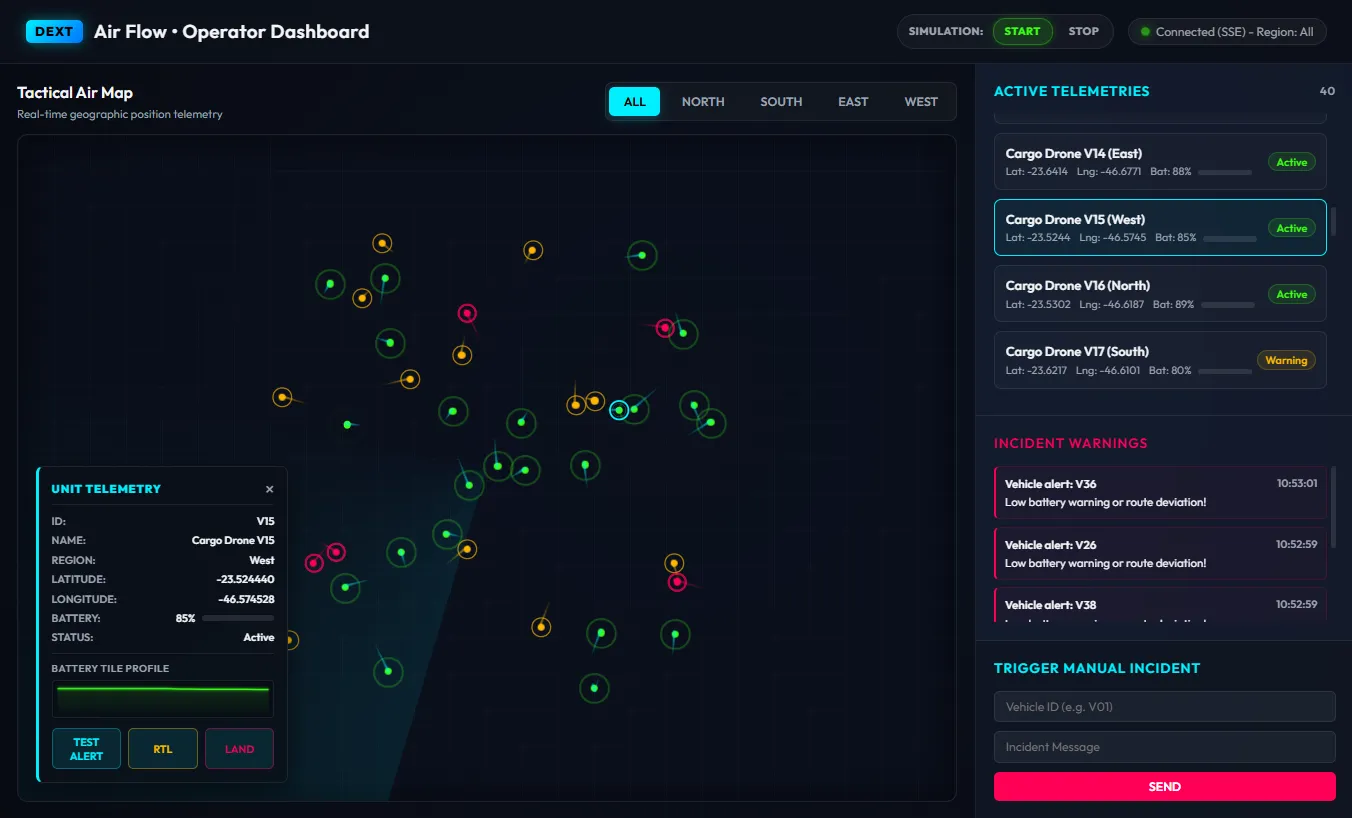
Developing modern web applications with real-time bidirectional communication often points developers toward platforms like Node.js or .NET Core with SignalR. However, in the Delphi ecosystem, the Dext framework demonstrates that it is possible to achieve extreme enterprise-grade performance running directly on top of the native Windows kernel API: HTTP.sys.
This article presents in detail the Dext AirFlow (Control Tower) sample project, demonstrating how we created a real-time tactical aerospace control panel, the architectural backend and frontend patterns adopted, and why combining native HTTP.sys with real-time messaging buses represents the state of the art for high-performance projects in Delphi.
What Makes HTTP.sys + Dext So Powerful?
Section titled “What Makes HTTP.sys + Dext So Powerful?”Traditionally, Delphi web servers rely on user-mode sockets (like Indy) or third-party servers. Dext changes this by providing a thin, high-performance abstraction over the Windows kernel-mode driver HTTP.sys (the same engine powering IIS).
The advantages of this approach for real-time applications are significant:
- Kernel-Level Routing: Control HTTP requests and handshake negotiations for persistent connections are received and pre-processed directly in the Windows Kernel, bypassing the context switching overhead common in user-mode servers.
- Port Sharing: Multiple applications can listen on the same physical port (e.g.,
:9000), as long as they register distinct request paths (friendly URLs) via HTTP.sys. - Native Scalability: The management of long-lived open connections (like Server-Sent Events / EventSource) is handled by the kernel itself, freeing the application to process business rules with extremely low CPU consumption.
Anatomy of the Sample Project: Dext AirFlow
Section titled “Anatomy of the Sample Project: Dext AirFlow”AirFlow simulates a tactical control center (Control Tower) managing 40 simultaneous cargo drones. It showcases the integration between:
- A physics and battery simulator running on background threads in Delphi.
- A real-time messaging Hub that distributes telemetry updates only to operators connected to the regions of interest.
- A rich and responsive web interface with micro-animations, dynamic consumption charts, and interactive bidirectional controls.
Watch the simulator and telemetry dashboard in action below:
📐 Backend Architecture (Delphi)
Section titled “📐 Backend Architecture (Delphi)”The backend is modular and structured around the concept of isolated threads and fast HTTP endpoints:
1. The Simulator (AirFlow.Simulator.pas)
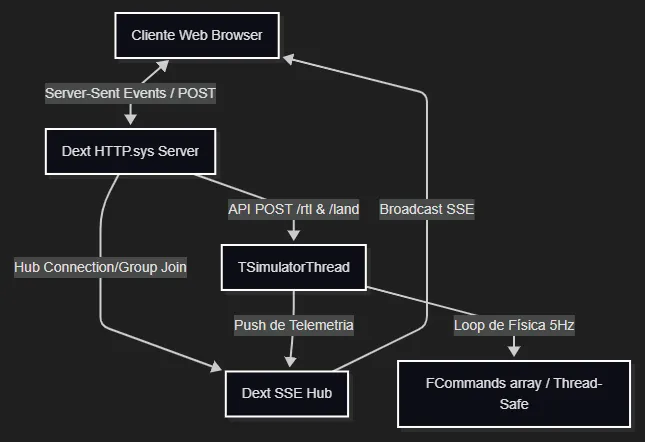
Section titled “1. The Simulator (AirFlow.Simulator.pas)”The simulator (TSimulatorThread) runs asynchronously, updating flight physics (Latitude, Longitude, Heading, Speed, and Battery) for 40 drones at a rate of 5 updates per second (5Hz).
- Thread-Safety: It uses a synchronous command array protected by a critical section (
TCriticalSection) to receive control commands from the HTTP.sys server thread without causing race conditions. - Efficient Telemetry Dispatch: On each iteration, data is formatted and pushed to the Dext Hub using the
IHubContextinterface. Operators only receive telemetry from the region they are monitoring (via SignalR-like group filtering).
2. REST Endpoints and Routes (AirFlow.Startup.pas)
Section titled “2. REST Endpoints and Routes (AirFlow.Startup.pas)”The Dext server exposes simplified tactical routes using a fluent and expressive syntax:
// Endpoint to trigger Return to Base (RTL) commandsApp.Builder.MapPost('/api/vehicles/{id}/rtl', procedure(Ctx: IHttpContext) var VehicleId: string; begin VehicleId := Ctx.Request.GetRouteParam('id'); Simulator.ForceRTL(VehicleId); Ctx.Response.SetStatusCode(200).SendJson('{"status":"RTL_ACK"}'); end);🎨 Walkthrough of Dashboard V2 Features
Section titled “🎨 Walkthrough of Dashboard V2 Features”The web interface was designed with a premium cyber-tactical aesthetic (glassmorphism and dark HSL neon color palettes) and features the following advanced mechanics:
1. Flight Tail Trail (Breadcrumbs Canvas)
Section titled “1. Flight Tail Trail (Breadcrumbs Canvas)”- What to look for on screen: Behind each circular drone marker on the map, you will see a glowing line trailing it like a “tail”.
- How it works: An overlay
<canvas>maintains a circular history of the last 15 coordinates for each drone. As the drone moves, the canvas redraws the trail, applying a fade-out gradient and rendering older positions with a thinner line to create a smooth trail effect. The trail color corresponds to the drone’s status (Cyan for Active, Yellow for Warning, Red for Stopped).
2. Pulsing Incident Indicators (Warning Rings)
Section titled “2. Pulsing Incident Indicators (Warning Rings)”- What to look for on screen: Drones entering a critical state on the map start emitting expanding pulsing rings from their center point.
- How it works: CSS animations with
@keyframesand pseudo-elements (::after) monitor the telemetry status in real time. If a drone transitions to aWarningstatus, a yellow ring pulses every 1.2s. If it enters a critical (Stopped) status, a thick red ring pulses rapidly every 0.8s, drawing the operator’s attention directly to the issue.
3. HUD Sparkline Charts (Battery Profile)
Section titled “3. HUD Sparkline Charts (Battery Profile)”- What to look for on screen: Clicking on a drone opens the floating Unit Telemetry panel, where the bottom section displays the BATTERY TILE PROFILE graph.
- How it works: JavaScript monitors an array of the last 20 battery levels reported for that specific drone. A mini-canvas renders a line chart with a filled area in real time. If the battery drops below 60%, the chart glows yellow; if it falls below 30%, both the chart and the fill glow red, indicating immediate power degradation.
4. Bidirectional Tactical Control (RTL and LAND)
Section titled “4. Bidirectional Tactical Control (RTL and LAND)”- What to look for on screen: Neon RTL and LAND buttons in each drone’s HUD telemetry panel.
- How it works:
- RTL (Return to Base): Clicking this sends a POST command to the server. The backend alters the simulation’s navigation vector. The drone rotates its heading directly toward the central control tower coordinates and travels back. Upon arrival, the simulator triggers an automatic landing sequence.
- LAND: Clicking this immediately drops the drone’s speed to zero. The battery begins draining by 5% per tick, simulating a forced landing, until it reaches 0% and transitions to the red
Stoppedstatus.
Patterns and Best Practices Adopted
Section titled “Patterns and Best Practices Adopted”URL Cooking with HTTP.sys in Delphi
Section titled “URL Cooking with HTTP.sys in Delphi”During implementation, we dealt with a crucial characteristic of the HTTP.sys wrapper in Delphi. The pointers provided by the native Windows API for the cooked URL (CookedUrl.pAbsPath and pQueryString) reside sequentially in the same buffer memory segment and are not null-terminated.
To extract paths and query parameters without data leaks or 404 routing errors, we implemented explicit length extraction using SetString:
// The correct way to extract paths from HTTP.sysSetString(Result, CookedUrl.pAbsPath, CookedUrl.AbsPathLength div SizeOf(WideChar));Frontend Rendering Performance and Smoothness
Section titled “Frontend Rendering Performance and Smoothness”To keep browser CPU usage low while managing 40 drones updating 5 times per second (200 messages/second in total), the web interface employs a Throttling with RequestAnimationFrame pattern: Incoming messages from the SSE connection only update an internal data dictionary. Visual rendering and DOM positioning updates are scheduled for the browser’s next available animation frame, ensuring stutter-free animations and optimized CPU usage.
Conclusion
Section titled “Conclusion”The Dext AirFlow project proves that Delphi is fully capable of powering modern, high-performance real-time tactical architectures. By leveraging the kernel-level HTTP.sys engine, we eliminate unnecessary middleware layers, providing operators with a stable, responsive, and visually outstanding experience.
Feel free to explore the source code and expand the example with new flight parameters and tactical alerts!
Useful Links and Documentation
Section titled “Useful Links and Documentation”To dive deeper into the implementation details and check other practical telemetry examples in the framework, refer to the official documentation:
- Example Source Code: Access on GitHub
- Telemetry Documentation (Dext Book PT-BR): Access the Technical Details
- Official Dext Repository: github.com/dotpas/dext