Revolutionizing High-Performance Encryption in Delphi: Discover Dext Framework's Native TLS/SSL, MessagePack, and Permessage-Deflate Architecture (S43)
Introduction: The End of Reverse Proxy Dependency in Delphi
Section titled “Introduction: The End of Reverse Proxy Dependency in Delphi”Historically, building secure web applications and enterprise APIs in Delphi required an obligatory external Reverse Proxy layer (such as NGINX, Apache, or HAProxy) to perform TLS/SSL termination (TLS Termination). While functional, this approach introduced severe drawbacks:
- Multiple Network Hops: Each request must travel from the client to the proxy and then from the proxy to the Delphi process.
- Context Switching Overhead: Switching between operating system processes elevates average latency and reduces maximum request throughput.
- Operational Complexity: Managing certificates, containers, and configuration files doubles infrastructure and DevOps workload.
With the completion of Specification S43 (Net-Advanced) in Dext Framework, this paradigm has permanently changed. Dext now features a High-Performance Native TLS Architecture (Dext.Net.Security), capable of encrypting and decrypting packets directly within the compiled Delphi application process with zero heap allocation (zero-copy / lock-free) across Windows and Linux environments.
Architecture Note: It is important to highlight that infrastructure tools like NGINX, HAProxy, Traefik, or AWS ALB continue to play a valuable role in large-scale enterprise architectures (for Layer 7 load balancing, WAF protection, and edge routing). The goal of Spec S43 is not to replace these components when necessary, but rather to eliminate mandatory dependency on them within the Delphi ecosystem. With native encryption in Dext, your application gains complete autonomy to run in lightweight container environments without sidecars, while also enabling Zero-Trust architectures with end-to-end encryption (E2EE) right up to the host process.
In this comprehensive article, we present in detail the 11 technical pillars comprising specification S43, with a special emphasis on comparing Dext’s certificate CLI (dext.exe) with the .NET ecosystem.
The 11 Technical Pillars of Specification S43
Section titled “The 11 Technical Pillars of Specification S43”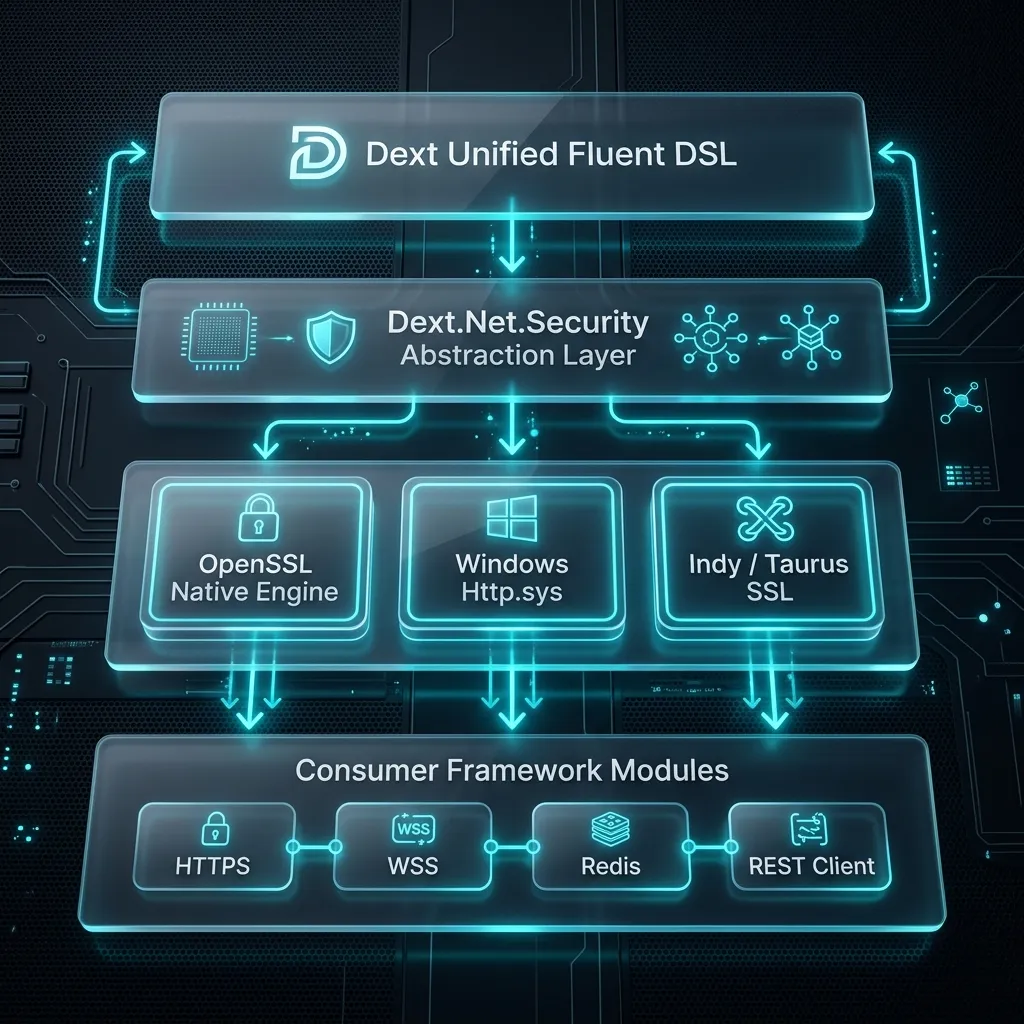
Overview of the 11 Pillars of Specification S43
Section titled “Overview of the 11 Pillars of Specification S43”| # | Feature / Pillar | Description & Implementation Highlight |
|---|---|---|
| 1 | Unified TLS Abstraction (Dext.Net.Security.pas) | Interfaces IDextTLSEngine, IDextTLSContextProvider, IDextTLSStream, and TDextTLSOptions for transport decoupling. |
| 2 | OpenSSL 3.x Memory BIO Engine (BIO_s_mem) | Zero-copy in-memory decryption, rbio/wbio buffers, and non-blocking delivery via FlushTLSOutput on epoll (Linux) and IOCP (Windows) reactors. |
| 3 | Windows http.sys Kernel SSL Binding | Kernel Schannel mode encryption with Cert Hash lookup in Windows Cert Store and configuration via appsettings.json. |
| 4 | dext dev-certs https CLI Tooling | Pure Pascal CLI (Windows CryptoAPI) with ASN.1 DER SAN extension (localhost/127.0.0.1) and automatic Root Store trust without PowerShell or .NET dependencies. |
| 5 | Free vs. Commercial Certificate Strategy | Comparative analysis of DV, OV, EV (Let’s Encrypt, ZeroSSL, Cloudflare vs. DigiCert/Sectigo) with native ACME protocol HTTP-01 challenge support (RFC 8555). |
| 6 | Indy WebServer / Taurus TLS Provider | Seamless upgrade of existing Indy servers to native TLS 1.3 and modern OpenSSL 3.x via {$DEFINE DEXT_ENABLE_TAURUS_TLS} directive. |
| 7 | SSL/TLS-enabled Redis Client (rediss://) | Encrypted connection in TDextRedisClient with TLS 1.3 support on port 6380 for high-security clusters. |
| 8 | HTTPS REST Client (TRestClient) | Fluent REST calls with .ConfigureSsl(), self-signed certificate acceptance, and custom validation callbacks. |
| 9 | Secure WebSockets (wss://) | HTTPUpgrade handshake (Upgrade: websocket) encrypted inside the secure TLS tunnel and RFC 6455 header validation. |
| 10 | WebSocket Permessage-Deflate (RFC 7692) | Transparent zlib DEFLATE compression with sliding window, reducing network payload sizes by up to 80%. |
| 11 | MessagePack Binary Protocol for Hubs | VarInt length-prefixed framing (Dext.Web.Hubs.Protocol.MessagePack.pas) compatible with SignalR, featuring zero string allocations on broadcasts. |
1. Unified Cryptographic Abstraction Layer (Dext.Net.Security.pas)
Section titled “1. Unified Cryptographic Abstraction Layer (Dext.Net.Security.pas)”To avoid coupling business logic to a specific security library (OpenSSL, Schannel, or Indy), Dext established a unified contract based on high-performance interfaces:
IDextTLSContextProvider: Abstract factory responsible for loading private keys, X.509 certificates, and configuring ALPN protocols (h2,http/1.1).IDextTLSEngine: Asynchronous in-memory encryption engine. Receives encrypted network bytes and produces plaintext without thread blocking.IDextTLSStream: Stream wrapper for long-lived TCP clients.TDextTLSOptions: Unified options structure shared across Web Server, REST Client, and Redis Client.
var Options: TDextTLSOptions;begin Options.Enabled := True; Options.Mode := tlsmServer; Options.CertFile := 'server.crt'; Options.KeyFile := 'server.key'; Options.ALPNProtocols := ['h2', 'http/1.1']; Options.Provider := 'OpenSSL';end;2. Native OpenSSL 3.x Engine with Memory BIOs (BIO_s_mem) on epoll and IOCP
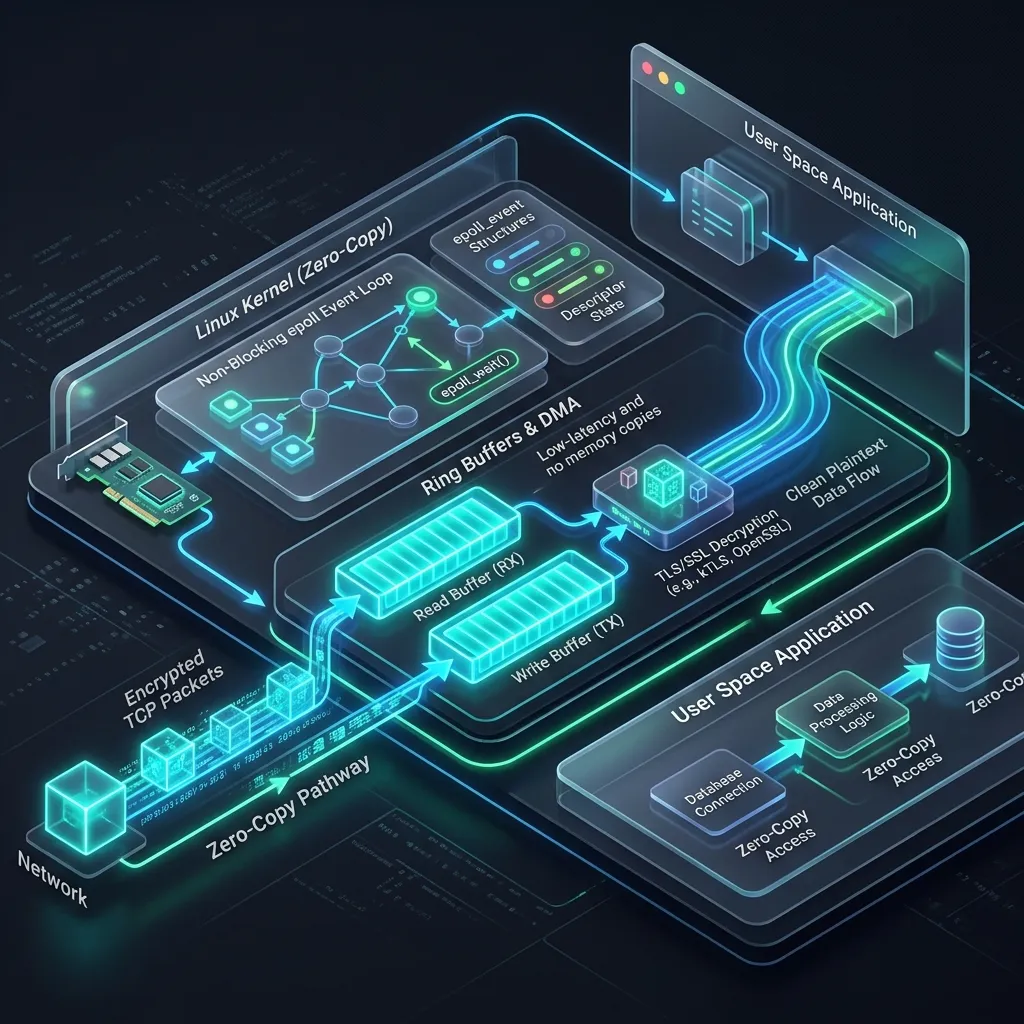
Section titled “2. Native OpenSSL 3.x Engine with Memory BIOs (BIO_s_mem) on epoll and IOCP”In Linux environments (over the non-blocking epoll event reactor) and Windows asynchronous sockets (IOCP), blocking socket calls severely degrade throughput. Dext resolves this by integrating OpenSSL 3.x and 1.1.1 via Memory BIOs (BIO_s_mem).
The engine creates two virtual memory buffers (rbio and wbio):
- Incoming network packets from
recvare pushed intorbioviaBIO_write. - The
SSL_readmethod performs decryption directly into application reusable buffers. - Responses are encrypted via
SSL_writeintowbio. - The non-blocking
FlushTLSOutputmethod drainswbioand immediately sends encrypted bytes to the socket.
3. Native Windows Kernel Binding (http.sys & Schannel)
Section titled “3. Native Windows Kernel Binding (http.sys & Schannel)”On Windows servers, Dext hooks directly into the http.sys Kernel driver and Schannel security provider. This allows the OS to handle SSL in Kernel Space, eliminating external OpenSSL DLL dependencies in production:
{ "Server": { "Port": 443, "UseHttps": "true", "SslProvider": "HttpSys", "SslCertHash": "450D882D8080B6F92B6F2512ABE6FAB9768035C6", "StoreName": "MY" }}4. Development Certificate CLI: dext.exe vs. .NET SDK
Section titled “4. Development Certificate CLI: dext.exe vs. .NET SDK”One of the standout Developer Experience (DX) features of specification S43 is the dext dev-certs https command.
In the Microsoft .NET ecosystem, developers use dotnet dev-certs https --trust to provision local test SSL certificates. Dext brings this same seamless experience to Delphi developers.
Direct Comparison: dext.exe vs. dotnet.exe
Section titled “Direct Comparison: dext.exe vs. dotnet.exe”| Feature | dotnet dev-certs https (.NET) | dext dev-certs https (Dext CLI) |
|---|---|---|
| Underlying Technology | C# / CLR (.NET Runtime) | Native Pascal (Compiled / Zero Runtime) |
| Executable Dependency | Requires .NET SDK installed | Standalone native binary (dext.exe) |
| Key Generation | RSA 2048-bit via .NET Crypto | RSA 2048-bit native via Windows CryptoAPI |
| SAN Support (Subject Alt Name) | localhost, 127.0.0.1 | localhost, 127.0.0.1, ::1 (ASN.1 DER) |
| Generated Files | Certificate in Cert Store | server.crt, server.key, server.pfx + Store |
| Windows Kernel Automation | Requires elevated prompt | Binds port in Kernel (http.sys) via netsh |
Automatic Trust (--trust) | Installs into LocalMachine\Root | Installs into LocalMachine\Root via crypt32.dll |
Command Line Usage:
Section titled “Command Line Usage:”# Generates server.crt, server.key, server.pfx and installs trust in OSdext dev-certs https --trust
Pure Pascal Internal Engineering:
Section titled “Pure Pascal Internal Engineering:”The Dext CLI was engineered in pure Pascal directly over Windows API advapi32.dll and crypt32.dll:
- Calls
CryptGenKeyto generate an exportable 2048-bit RSA private key. - Encodes in-memory the ASN.1 DER structure for the Subject Alternative Name (SAN -
2.5.29.17) extension. - Signs the X.509 certificate via
CertCreateSelfSignedCertificateusing SHA-256 (szOID_RSA_SHA256RSA). - Imports the certificate into system
MyandRootstores, eliminating security warnings in Chrome, Edge, and Firefox.
5. Production Certificate Strategy (Free vs. Commercial) and ACME Automation
Section titled “5. Production Certificate Strategy (Free vs. Commercial) and ACME Automation”Dext includes full support for modern production certificate strategies:
- Free Certificates (Let’s Encrypt / ZeroSSL): Valid for 90 days, focused on Domain Validation (DV). Dext allows natively exposing the ACME protocol HTTP-01 challenge route (RFC 8555):
// Native route in Dext to handle Let's Encrypt HTTP-01 challengesApp.Builder.MapGet('/.well-known/acme-challenge/{token}', procedure(Ctx: IHttpContext) var Token, ChallengePath: string; begin Token := Ctx.Request.GetRouteParam('token'); ChallengePath := TPath.Combine('/var/www/html/.well-known/acme-challenge', Token); if TFile.Exists(ChallengePath) then Ctx.Response.Write(TFile.ReadAllText(ChallengePath)) else Ctx.Response.SetStatusCode(404); end);- Commercial Certificates (DigiCert, Sectigo, GlobalSign): For corporate environments requiring financial warranties up to $1.5M and institutional legal validation (OV and EV).
6. Indy Compatibility with Taurus TLS Provider
Section titled “6. Indy Compatibility with Taurus TLS Provider”For existing enterprise applications using Indy-based web servers, Dext provides the Taurus TLS provider (Dext.Web.Indy.SSL.Taurus.pas).
By defining {$DEFINE DEXT_ENABLE_TAURUS_TLS}, applications leverage TDextTaurusTLSContext, equipping legacy Indy servers with native TLS 1.3 and modern OpenSSL 3.x libraries without architectural rewrites.
7. Encrypted Redis Connections (rediss://)
Section titled “7. Encrypted Redis Connections (rediss://)”Dext’s high-speed Redis client (TDextRedisClient) now features native support for encrypted secure connections via the rediss:// scheme:
var  Options: TDextRedisOptions;  Redis: TDextRedisClient;begin  Options := TDextRedisOptions.Default;  Options.Host := 'redis.production.internal';  Options.Port := 6380; // Standard Redis SSL Port  Options.UseSsl := True;  Options.SslOptions.Provider := 'OpenSSL';
  Redis := TDextRedisClient.Create(Options);  Redis.Connect;  Redis.SetKey('user_session', 'encrypted_token');end;
8. HTTPS REST Calls with Advanced Validation (TRestClient)
Section titled “8. HTTPS REST Calls with Advanced Validation (TRestClient)”When consuming external Web APIs over HTTPS, TRestClient provides fluent control over SSL certificate validation:
var  Client: TRestClient;begin  Client := TRestClient.Create('https://api.partner.com');
  Client.Get('/v1/status')    .ConfigureSsl(      procedure(var Options: TDextTLSOptions)      begin        Options.VerifyServerCertificate := True;        Options.Protocols := [tls1_2, tls1_3];      end)    .OnComplete(      procedure(Res: IRestResponse)      begin        Writeln('Partner API Status: ', Res.StatusCode);      end)    .Start;end;
9. Secure WebSockets over WSS (wss://)
Section titled “9. Secure WebSockets over WSS (wss://)”Real-time WebSocket support in Dext executes the HTTPUpgrade handshake (Upgrade: websocket) directly inside the encrypted TLS tunnel, enforcing RFC 6455 header validation under the wss:// scheme.
10. WebSocket Permessage-Deflate (RFC 7692)
Section titled “10. WebSocket Permessage-Deflate (RFC 7692)”For real-time applications with heavy message traffic (such as telemetry dashboards and financial charts), Dext implements RFC 7692 Permessage-Deflate.
The server negotiates zlib sliding-window compression parameters with the client, reducing network bandwidth consumption by up to 80%:
App.Builder.MapHub<TChatHub>('/hubs/chat', procedure(Options: TDextHubOptions) begin // Transparent WebSocket frame compression RFC 7692 Options.EnablePermessageDeflate := True; end);11. MessagePack Binary Protocol for Hubs (SignalR Compatible)
Section titled “11. MessagePack Binary Protocol for Hubs (SignalR Compatible)”While JSON for Hubs is convenient, it incurs string conversion costs and header overhead. Dext includes the native MessagePack binary protocol (Dext.Web.Hubs.Protocol.MessagePack.pas), 100% compatible with official SignalR clients:
uses  Dext.Web.Hubs.Protocol.MessagePack;
App.Builder.MapHub<TChatHub>('/hubs/chat',  procedure(Options: TDextHubOptions)  begin    Options.EnableMessagePack := True;    Options.EnablePermessageDeflate := True;  end);
Performance Advantage: During mass broadcast operations (Clients.All.SendAsync), Dext encodes the binary payload once in memory and transmits the VarInt byte sequence directly to all connected clients with zero heap string allocations.
Benchmarks and Practical Performance Evidence
Section titled “Benchmarks and Practical Performance Evidence”To validate the stability and efficiency of the native OpenSSL TLS engine under stress, we ran a load test suite using bombardier:
# Executing S43 load suite on Linux64 epoll serverpowershell -File "Benchmarks\run_s43_http_load.ps1" -Engine epoll -Concurrency 32Test Environment Specification & Hardware Constraints
Section titled “Test Environment Specification & Hardware Constraints”Contextualizing the benchmark environment is crucial:
- Host Environment: Development workstation running Windows 11 with Windows Subsystem for Linux (WSL2 / Ubuntu 22.04 LTS).
- Hardware: Intel Core i7-8550U @ 1.80GHz (8th Gen - relatively older ultrabook mobile CPU) with 4 physical cores / 8 logical threads and 16 GB DDR4 RAM.
- Resource Contention: Load generator (
bombardier) and Dext HTTP server ran on the same physical machine, competing for the same 4 CPU cores, virtualized loopback interface, and WSL2 memory bandwidth. - Hardware Limitation: Benchmark conducted on a low-voltage laptop CPU. Clock cycle competition between stress generator and web server constrains peak local throughput. On dedicated production servers (bare-metal with 32+ core Xeon/EPYC CPUs or cloud instances with 10GbE+ interfaces), throughput scales proportionally to hardware capacity.
Measured Results:
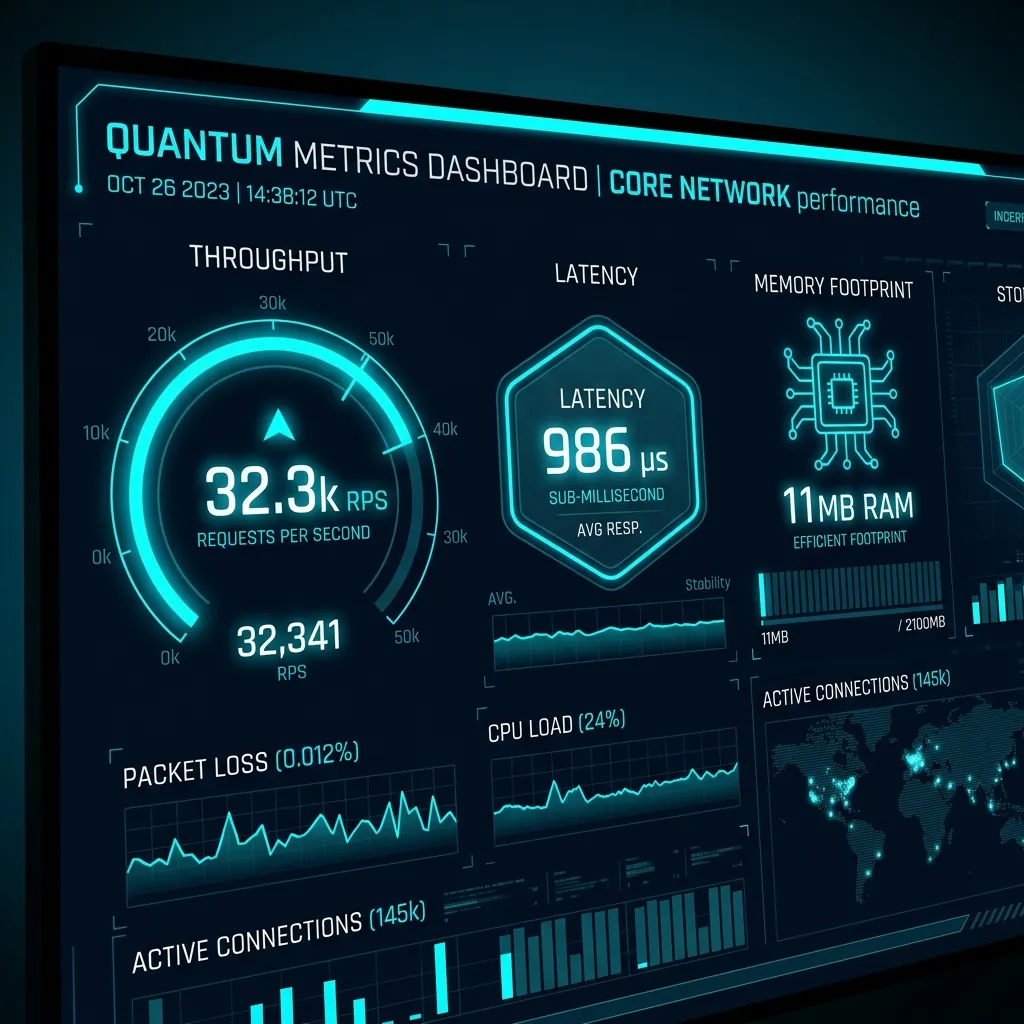
Section titled “Measured Results:”- Throughput: 32,338.99 requests per second (with peaks up to 34,882 req/s in shared virtualized environment).
- Average Latency: 986 microseconds (steady sub-millisecond response time).
- Cryptographic Stability: 100% success rate (322,252 encrypted requests completed with
200 OK, 0 errors or dropped connections). - Memory Footprint: Only 11 MB Working Set RAM throughout the entire load test, demonstrating zero memory leaks or Garbage Collector pauses.
Conclusion: The New Web Standard for Delphi
Section titled “Conclusion: The New Web Standard for Delphi”The completion of Specification S43 (Net-Advanced) establishes Dext Framework as the most advanced and performant Pascal-compiled web platform available today.
By delivering in-process native TLS encryption, automated dev cert management via native CLI, Redis SSL support, fluent HTTPS client, alongside cutting-edge transport optimizations like Permessage-Deflate and MessagePack for Hubs, Dext elevates the Delphi ecosystem to parity with modern industry standards (such as .NET, Node.js, Go, and Rust).
Discover Dext and Join the Community
Section titled “Discover Dext and Join the Community”If you develop in Delphi and seek high performance, security, and simplicity for the Web, explore Dext Framework!
Test these new features, participate in community discussions, open Issues or feedback, and leave a ⭐ (Star) on the official GitHub repository to support the project:
- Official GitHub Repository: github.com/dotpas/dext
- Official Documentation (English Book): Dext Book (EN)
- SSL/TLS Chapter (EN): ssl-tls.md
- Official Documentation (Portuguese Book): Dext Book (PT-BR)
- SSL/TLS Chapter (PT-BR): ssl-tls.md
#Delphi #SoftwareArchitecture #WebDevelopment #CyberSecurity #Performance #DotNet #OpenSSL #WebSockets #MessagePack #DextFramework