The Modern Rest Client Delphi Deserved: Meet Dext Rest Client

Delphi has always been synonymous with productivity. However, as our applications evolve into distributed architectures and microservices, the way we consume APIs needs to keep up with this modernity.
Often, the traditional approach based on visual components (TRestClient), while excellent for prototyping, can add unnecessary complexity and verbosity to production code, especially when dealing with dynamic requests, complex authentication, and concurrency.
In developing the Dext Framework, we sought a development experience that combined Delphi’s native performance with the elegance of modern fluent APIs.
The result is Dext.Net.RestClient. And it will change the way you consume APIs in Delphi.
1. The End of “Component-Hell”
Section titled “1. The End of “Component-Hell””Dext Rest Client adopts a Code-First approach. Forget visual components. The code should tell the complete story of the request.
How we used to do it (Traditional Way):
- Drag
TRestClient1component - Drag
TRestRequest1(and link it to the client) - Drag
TRestResponse1(and link it to the request) - In code:
RestRequest1.Params.AddItem('Authorization', 'Bearer ' + Token, pkHTTPHEADER); RestRequest1.Execute;
How we do it with Dext (Fluent Way):
uses  Dext.Net.RestClient; // The only unit you need
var  Users: TList<TUser>;begin  Users := RestClient('https://api.example.com')    .BearerToken(MyJwtToken)    .Timeout(5000)    .Get<TList<TUser>>('/users?role=admin') // Automatic List Serialization!    .Await;                                 // Synchronous or Asynchronous, you chooseend;
It is clean, readable, and most importantly, compile-time safe. If you change the return type, the compiler warns you.
2. Performance: The Power of Connection Pooling
Section titled “2. Performance: The Power of Connection Pooling”Here is the secret that makes Dext much faster than the standard implementation for high-load scenarios.
Creating an instance of TNetHttpClient is expensive (OS Handles, SSL Handshake, etc). If you create and destroy a Client for each request in a loop, your performance suffers.
Dext’s TRestClient is effectively a lightweight Record that acts as a facade for a Thread-Safe Connection Pool.
- When you make a request, we grab a “hot” (already created)
THttpClientfrom the pool. - We execute the request.
- We return it to the pool immediately.
This allows your application to scale to handle high concurrency efficiently, reusing costly TCP/SSL connection resources. And yes, it is 100% Thread-Safe by design.
3. Async Architecture and “Delphi Threads”
Section titled “3. Async Architecture and “Delphi Threads””Dext does not rely on manual calls like ProcessMessages (which can generate reentrancy side effects) to keep the UI responsive. It is built on the Dext.Threading library, using an intelligent thread pool (Work Stealing).
The Cancellation Token Hook
Section titled “The Cancellation Token Hook”In my book, “Delphi Multithreading”, I dedicate an entire topic to explaining why canceling a task is just as vital as executing it.
Imagine an “Auto-Complete”. The user types “D”, “e”, “l”… you don’t want 3 requests competing. You want to cancel the previous one as soon as the next one arrives.
With Dext, this is trivial:
procedure TFormSearch.EditChange(Sender: TObject);begin  // Automatically cancels the previous search  CancellationTokenSource.Cancel;  CancellationTokenSource := TCancellationTokenSource.Create;
  RestClient.Get<TSearchResult>('/search')    .QueryParam('q', EditSearch.Text)    .Cancellation(CancellationTokenSource.Token) // Native integration    .OnComplete(procedure(Res: TSearchResult)      begin        // Automatic update on Main Thread        Grid.DataSource := Res.Verify;      end)    .Start;end;
Pipelines and Chaining
Section titled “Pipelines and Chaining”What if you need to authenticate before fetching data? Instead of nesting callbacks (“Callback Hell”), you can chain operations linearly using the .ThenBy method.
Dext.Net.RestClient integrates perfectly with Dext.Threading.Async, allowing the result of one request to feed the next:
RestClient.Get<TToken>('/auth/token') .ThenBy<TUser>( function(Token: TToken): TUser begin // This block runs automatically after the first request succeeds. // And inside it, we can make another synchronous call (Await) without blocking the UI! Result := RestClient.Get('/profile') .Header('Authorization', Token.AccessToken) .Execute<TUser> .Await; end) .OnComplete(procedure(User: TUser) begin // Only gets here when EVERYTHING finishes successfully UserProfile.Text := User.Name; end) .Start;This transforms complex flows into flat, easy-to-read code.
4. Innovation: .http Files (The Market Standard)
Section titled “4. Innovation: .http Files (The Market Standard)”This is the killer feature for productivity.
Dext brings native support for .http files (standard used by VS Code and IntelliJ). You can document and test your APIs in simple text files inside your project:
@baseUrl = https://api.production.com@authToken = eyJhbGciOiJIUzI1Ni...
### Create New OrderPOST {{baseUrl}}/ordersAuthorization: Bearer {{authToken}}Content-Type: application/json
{    "productId": 1050,    "qty": 5}
Simple and powerful syntax: Variables with @, request separator with ###.
And in your Delphi code, you execute this directly:
uses  Dext.Http.Parser;
var  Requests: THttpRequestCollection;  Req: THttpRequestInfo;begin  // 1. Load the file  Requests := THttpRequestParser.ParseFile('orders.http');  try    // 2. Find request by name    Req := Requests.FindByName('Create New Order');
    // 3. Resolve variables (interpolating {{baseUrl}})    THttpRequestParser.ResolveRequest(Req, Requests.Variables);
    // 4. Execute    RestClient.Execute(Req).Await;  finally    Requests.Free;  end;end;
5. Dext Dashboard: Your Native “Postman”
Section titled “5. Dext Dashboard: Your Native “Postman””We integrated this support into Dext Dashboard. Look at this:
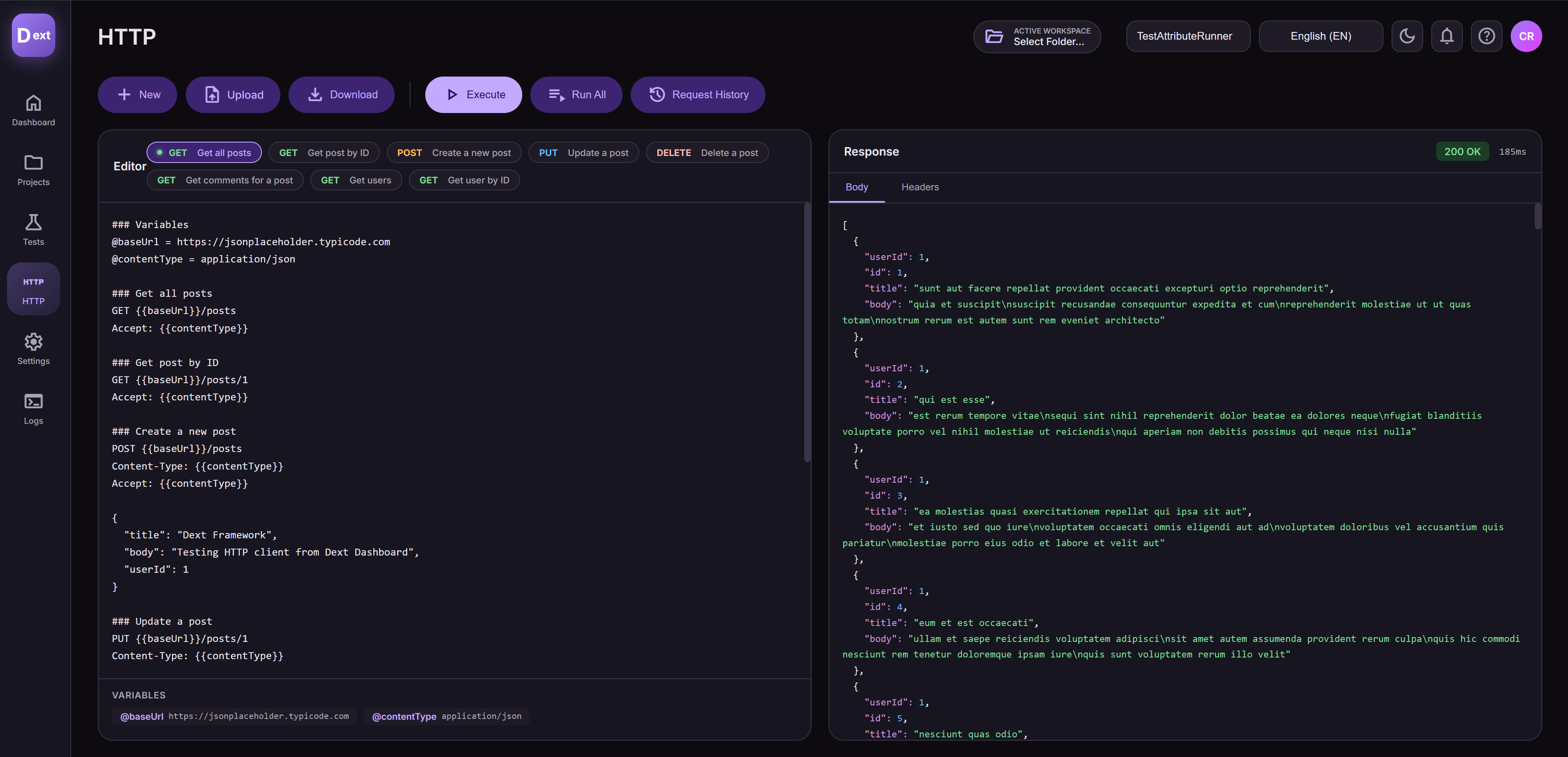
No more maintaining outdated Collections in external tools.
With Dext Dashboard, you execute your project’s own .http files. It is the same “source of truth” for code, for tests, and for the developer.
- Editing with Syntax Highlighting: Write your
.httpwith comfort. - Real Execution: The Dashboard runs the request using the same
Dext.Net.RestClientengine as your application. What you see is exactly what your code will receive. - History and Logs: Analyze response time, headers, and formatted JSON payload.
This keeps you in the “Flow State”. Code, Test, Documentation… all in the same place.
6. Testability: The DataModule Nightmare Is Over
Section titled “6. Testability: The DataModule Nightmare Is Over”Any developer who has tried to create unit tests for a form or DataModule coupled to TRestClient components knows the pain. You need to instantiate the form, ensure the IDE doesn’t create automatic connections, and it’s almost impossible to “fake” (mock) a server response without spinning up a local HTTP server.
Dext.Net.RestClient was designed with TDD (Test Driven Development) in mind.
The interface-based architecture (IRestClient) allows you to easily inject mocks using Dext.Mocks and validate results with Dext.Testing, without relying on external libraries.
Example of Business Rule Test (Isolated from Network):
uses  Dext.Mocks, Dext.Assertions;
procedure TFreightServiceTest.ShouldHandleApiError;var  MockClient: Mock<IHttpClient>; // Abstracted interface  Service: TFreightService;begin  // Configure Mock  MockClient := Mock<IHttpClient>.Create;
  // Define behavior: When calling 'Calculate', return error 503  MockClient.Setup.Returns(503).When.Calculate(Arg.Any<string>);
  // Inject the mock (no real network!)  Service := TFreightService.Create(MockClient.Instance);
  // Validate behavior with Fluent Assertions  // If API fails, service should return 0.0 (business rule)  Should(Service.CalculateFreight('12345-678')).Be(0.0);end;
This ability to decouple your business logic from network infrastructure is what differentiates professional applications from hard-to-maintain legacy code.
7. The Full Cycle: Integration Tests with Controllers
Section titled “7. The Full Cycle: Integration Tests with Controllers”Let’s raise the bar. Imagine testing your Dext HTTP server (Controller) using Dext Rest Client itself and .http files as test data.
Consider this Orders Controller:
type  [DextController('/api/orders')]  TOrdersController = class(TController)  private    FService: IOrderService;  public    constructor Create(AService: IOrderService);
    [DextPost]    function CreateOrder([Body] Order: TOrderDTO): IActionResult;  end;
We can write an Integration Test that spins up the server in memory, injects a Mocked Service into the Controller, and uses .http files to validate the response.
First, the scenario file scenarios/create-order.http:
### Create New OrderPOST /api/ordersContent-Type: application/json
{    "productId": 1050,    "qty": 5}
Now, the test that runs this scenario against the in-memory server:
procedure TIntegrationTest.TestCreateOrderFlow;var  Server: TDextApplication;  MockService: Mock<IOrderService>;  Response: IRestResponse;  RequestInfo: THttpRequestInfo;  Requests: THttpRequestCollection;begin  // 1. Configure Backend Service Mock  MockService := Mock<IOrderService>.Create;  MockService.Setup.Returns(True).When.ProcessOrder(Arg.Any<TOrder>);
  // 2. Spin up Server in Memory injecting the Mock  // DextApplication can be instantiated lightweight for tests  Server := TDextApplication.Create;  Server.Services.AddSingleton<IOrderService>(MockService.Instance);  Server.Start(8090); // Random/dedicated port for test
  try    // 3. Load the .http file    // Dext has a native parser for this format    Requests := THttpRequestParser.ParseFile('scenarios/create-order.http');    try      // Get request by defined name (### Create New Order)      RequestInfo := Requests.FindByName('Create New Order');
      // Resolve variables (Test server URL)      RequestInfo.Url := 'http://localhost:8090' + RequestInfo.Url;
      // 4. Execute real request      Response := RestClient        .Execute(RequestInfo) // Method accepting the parser object!        .Await;
      // 5. Validate response      Should(Response.StatusCode).Be(201);      Should(Response.ContentString).Contain('"status":"created"');
    finally      Requests.Free;    end;  finally    Server.Stop;    Server.Free;  end;end;
This is elegant End-to-End Testing. Your .http file serves as living documentation and as a driver for your automated tests.
8. Start Today in Your Legacy (VCL/FMX)
Section titled “8. Start Today in Your Legacy (VCL/FMX)”You might be thinking: “This is beautiful, but my system is a 10-year-old monolithic Desktop ERP, I can’t rewrite everything for Web now”.
The good news: You don’t have to.
Dext.Net.RestClient is completely decoupled. You can start using it today in your VCL or FMX project and begin replacing those verbose HTTP calls bit by bit.
No need to migrate the database, no need to create Controllers. Just add the unit to uses and start writing new code (or refactoring the old) with modern quality. It’s the perfect entry point to modernize your stack without the risk of a total rewrite.
Epilogue: “Is This Really Delphi?”
Section titled “Epilogue: “Is This Really Delphi?””If you got this far, you saw dependency injection, expressions, generics, real asynchronous programming, and fluent tests.
If I had hidden the begin/end keywords, you would probably swear you were reading an article about C# or TypeScript, right? Well. Delphi has evolved. And with Dext Framework, we ensure your code evolves with it.
Conclusion and Call to Action
Section titled “Conclusion and Call to Action”Dext.Net.RestClient is not just an HTTP wrapper; it is a modernization of how we think about connectivity in Delphi. It unites Pascal’s type safety, the elegance of fluent APIs, and the power of modern asynchrony.
This project is Open Source and made by the community, for the community.
If you liked what you saw and want to support this evolution of the Delphi ecosystem, visit our repository and leave a Star ⭐. This helps us a lot to continue building high-level tools for you.
👉 Give a ⭐ on GitHub now: github.com/cesarliws/dext
Want to master Asynchrony in Delphi?
Section titled “Want to master Asynchrony in Delphi?”To thoroughly understand how Dext.Threading (the engine behind this Rest Client) works, check out my new book: